sung
Music data access. Sources from chords&lyrics dataset, spotify and wikipedia. pypi Documentation
Install
To install: pip install sung
Chords and Lyrics Processing
The sung package provides powerful tools for processing chord sheets and lyrics, including parsing, filtering, formatting, and rendering to various formats.
Basic Usage
from sung import render_chords_and_lyrics, search_songs

# Search for songs in the dataset
songs = search_songs(title="wonderwall", artist="oasis")
print(f"Found {len(songs)} songs")

# Get the raw chord sheet text
raw_text = songs.iloc[0]["chords&lyrics"]

# Render to text (reconstruct the original format)
formatted_text = render_chords_and_lyrics(raw_text, to="text")
print(formatted_text)

# Render to PDF
render_chords_and_lyrics(raw_text, to="pdf", output_path="song.pdf")
Advanced Features
Filter Non-Lyrics Content
Remove extraneous text that isn’t part of the actual song. The keyword is apply_filter_non_lyrics – filter_non_lyrics is the standalone function it delegates to, and passing that name as a keyword is silently ignored:
from sung import remove_non_lyrics

# Remove non-lyrics content (section headers, metadata, etc.)
clean_lyrics = render_chords_and_lyrics(
    raw_text, to="text", apply_filter_non_lyrics=True
)

# Keep metadata lines like [Verse], [Chorus]
clean_with_metadata = render_chords_and_lyrics(
    raw_text, to="text", apply_filter_non_lyrics=True, keep_metadata_lines=True
)

# Standalone function
clean_text = remove_non_lyrics(raw_text)
Pack Lines for Better Space Usage
Combine short lines to make better use of horizontal space:
from sung import pack_song_text

# Pack lines up to 80 characters
packed_text = render_chords_and_lyrics(
    raw_text, to="text", pack_lines=True, max_line_length=80
)

# Standalone function
packed = pack_song_text(raw_text, max_length=80)
Combine Features
Use both filtering and packing together:
# Clean and optimized output
optimized = render_chords_and_lyrics(
    raw_text,
    to="text",
    apply_filter_non_lyrics=True,
    pack_lines=True,
    max_line_length=80,
)
PDF Rendering with Custom Styling
# Custom fonts and spacing
render_chords_and_lyrics(
    raw_text,
    to="pdf",
    output_path="styled_song.pdf",
    page_size="LETTER",  # Can use strings like 'A4', 'LETTER', 'LEGAL'
    lyrics_font={"name": "Times-Roman", "size": 14, "color": "black"},
    chords_font={"name": "Helvetica-Bold", "size": 12, "color": "blue"},
    title_font={"name": "Helvetica-Bold", "size": 18, "color": "darkred"},
    margin=50,
    spacing_chord_lyrics=15,
    spacing_group=20,
)
Dataset Access
The package provides access to a large dataset of songs with chords and lyrics:
from sung import get_lyrics_and_chords_dataset

# Load the full dataset (cached after first load)
df = get_lyrics_and_chords_dataset()
print(f"Dataset contains {len(df)} songs")

# A local copy of the zip is read directly, with no Kaggle credentials:
# pass zip_path=, or set SUNG_CHORDS_AND_LYRICS_ZIP, or keep it where haggle
# downloads it ($HAGGLE_ROOTDIR/zips/eitanbentora/chords-and-lyrics-dataset.zip).
# usecols= loads only the columns you need (the CSV is ~650 MB).
df = get_lyrics_and_chords_dataset(
    usecols=["artist_name", "song_name", "chords&lyrics"]
)

# Search by multiple criteria
results = search_songs(
    title="hotel california", artist="eagles", lyrics="welcome to the hotel"
)
Core Functions
render_chords_and_lyrics(): Main function for rendering chord sheetssearch_songs(): Search the song databaseparse_chord_lyrics(): Parse raw chord/lyrics text into structured datafilter_non_lyrics(): Remove non-lyrics contentpack_song_lines(): Combine short lines for better formattingextract_title(): Extract song title from chord sheetget_lyrics_and_chords_dataset(): Access the full dataset
Spotify
For spotify tools, you’ll also need spotify API access info:
export SPOTIFY_API_CLIENT_ID="your_api_client_id"
export SPOTIFY_API_CLIENT_SECRET="your_api_client_secrete"
export SPOTIPY_REDIRECT_URI="http://127.0.0.1:8000/callback"
export SPOTIPY_CLIENT_ID="$SPOTIFY_API_CLIENT_ID"
export SPOTIPY_CLIENT_SECRET="$SPOTIFY_API_CLIENT_SECRET"
Spotify API credentials?
To obtain Spotify API credentials, follow these steps:
1.	Create a Spotify Developer Account:

•	Visit the [Spotify Developer Dashboard](https://developer.spotify.com/dashboard/).

•	Log in with your Spotify account or create a new one.

2.	Register a New Application:

•	Click on “Create an App.”

•	Provide an App Name and App Description.

•	Agree to the Developer Terms of Service.

•	Click “Create.”

3.	Retrieve Client ID and Client Secret:

•	After creating the app, you’ll be directed to the app’s dashboard.

•	Here, you’ll find your Client ID and Client Secret.

•	Keep these credentials secure; they are essential for API authentication.

4.	Set Redirect URIs (if applicable):

•	In your app settings, click “Edit Settings.”

•	Under “Redirect URIs,” add the URIs where Spotify should redirect after authentication.

•	This is crucial for certain authorization flows.
For detailed information on authorization flows and using your credentials, refer to Spotify’s Authorization Guide.
Ensure you handle your Client Secret securely and adhere to Spotify’s Developer Terms of Service.
Note on redirect URIs. Spotify rejects
http://localhostas “Insecure” since April 2025. Usehttp://127.0.0.1:PORT/callbackand add that exact value (no trailing slash, exact case) in your app dashboard’s Redirect URIs.
Note on audio features. Spotify removed
/audio-featuresaccess for apps registered after Nov 2024.sungdegrades gracefully:Tracks.audio_featuresreturns{}with a one-time warning, andTracks.data/Playlist.datafall back to metadata-only.
Building a Spotify Playlist from a List of Song Names
Got a list of song names (from a setlist, a chat, a markdown doc) and want
a playlist? Use playlist_from_songs — it searches Spotify for each
song, picks the best match (preferring exact title + artist matches and
filtering out covers/karaoke), and creates the playlist in one call.
from sung import playlist_from_songs

songs = [
    ("Clocks", "Coldplay"),
    "Fix You — Coldplay",  # also: "Title - Artist", "Title by Artist"
    {"name": "Believer", "artist": "Imagine Dragons"},
    "Radioactive",  # title only is fine, but match quality drops
]

playlist, matches = playlist_from_songs(
    songs,
    playlist_name="My Mix",
    # public=True,           # default
    # market="US",           # optional ISO market code
    # search_limit=10,       # candidates to consider per song
    # skip_missing=True,     # drop unresolved instead of raising
)

print(playlist.playlist_url)
for m in matches:
    print(m.summary())
    if m.ambiguous:
        for c in m.candidates[:3]:
            print(
                "   alt:",
                c["name"],
                "—",
                ", ".join(c["artists"]),
                "pop=",
                c["popularity"],
            )
matches is a list[SongMatch]. Each match exposes track_id,
track_name, artist_names, album_name, popularity, plus
ambiguous: bool (top two candidates are different songs/artists scoring
within 10 points — worth showing alternatives) and not_found: bool.
CLI
For one-shot use from a file (or stdin), the same logic is wrapped as
python -m sung.playlists:
# songs.txt — one song per line; "Title - Artist" or just "Title".
# Comment lines (#), markdown bullets (-, *, 1.), and **bold** are tolerated.
python -m sung.playlists songs.txt --name "My Mix"

# Inspect matches without creating the playlist:
python -m sung.playlists songs.txt --dry-run

# JSON report (for chaining):
python -m sung.playlists songs.txt --name "My Mix" --json

# stdin works too:
cat songs.txt | python -m sung.playlists - --name "My Mix"
Other flags: --private (default is public), --market US.
Lower-level building blocks
If you want to inspect matches before creating anything (or hand-tune ranking), the helper is a thin layer over:
parse_song_descriptor(...)— turn a descriptor into(name, artist)resolve_song(...)/resolve_songs(...)— search + rank, returnSongMatch(es)Playlist.create_from_track_list(...)— actually creates the playlistdelete_playlist(playlist_id, ask_confirmation=False)— clean up
Using the sung.base Module to Search Tracks and Create a Playlist
In this example, we’ll:
Search for tracks using
Tracks.search.See the search results from the dict-like
tracksinstanceDisplay the search results in a pandas DataFrame.
Create a playlist called “my_test_playlist” with the selected tracks.
Get the URL of the newly created playlist.
Delete a playlist
Instantiate a
Playlistobject using a URL.Look at audio features aof this playlist
Import the necessary classes from the sung.base module
from sung.base import Tracks, Playlist
Search for tracks with the query ‘Love’, limiting the results to 7 This will return a Tracks object containing the search results
tracks = Tracks.search(query="Love", limit=7)
list(tracks)
['1vrd6UOGamcKNGnSHJQlSt',
 '3CeCwYWvdfXbZLXFhBrbnf',
 '1dGr1c8CrMLDpV6mPbImSI',
 '0u2P5u6lvoDfwTYjAADbn4',
 '6nGeLlakfzlBcFdZXteDq7',
 '6dBUzqjtbnIa1TwYbyw5CM',
 '7hR22TOX3RorxJPcsz5Wbo']
You can also make a tracks object by passing a list of track IDs or urls
track_ids = [
    "1vrd6UOGamcKNGnSHJQlSt",
    "3CeCwYWvdfXbZLXFhBrbnf",
    "1dGr1c8CrMLDpV6mPbImSI",
    "0u2P5u6lvoDfwTYjAADbn4",
    "https://open.spotify.com/track/6nGeLlakfzlBcFdZXteDq7",  # url
    "https://open.spotify.com/track/6dBUzqjtbnIa1TwYbyw5CM",  # url
    "spotify:track:7hR22TOX3RorxJPcsz5Wbo",  # uri
]

tracks = Tracks(track_ids)
tracks is a Mapping (that means “dict-like”), so you can do what you do with dicts…
Like listing the tracks’ keys (IDs)
list(tracks)
['1vrd6UOGamcKNGnSHJQlSt',
 '3CeCwYWvdfXbZLXFhBrbnf',
 '1dGr1c8CrMLDpV6mPbImSI',
 '0u2P5u6lvoDfwTYjAADbn4',
 '6nGeLlakfzlBcFdZXteDq7',
 '6dBUzqjtbnIa1TwYbyw5CM',
 '7hR22TOX3RorxJPcsz5Wbo']
Like Accessing the value of a track for a given key. The value is a bunch of metadata about the track.
track_metadata = tracks["1dGr1c8CrMLDpV6mPbImSI"]  # get metadata of track via it's id
assert isinstance(track_metadata, dict)
sorted(track_metadata)
['album',
 'artists',
 'available_markets',
 'disc_number',
 'duration_ms',
 'explicit',
 'external_ids',
 'external_urls',
 'href',
 'id',
 'is_local',
 'name',
 'popularity',
 'preview_url',
 'track_number',
 'type',
 'uri']
But we also have extras over normal dicts.
We can get metadata of a track via it’s index:
track_metadata = tracks[2] # get metadata of track via it's id
We can get a sublist of track metadatas from a list of ids.
list_of_track_metadatas = tracks[
    ["6dBUzqjtbnIa1TwYbyw5CM", "1vrd6UOGamcKNGnSHJQlSt"]
]  # get metadata of tracks via a list of ids
We can also get a sublist using slicing.
list_of_track_metadatas = tracks[2:4] # get metadata of tracks via a slice of ids
Display the search results in a pandas DataFrame
The dataframe method converts the track metadata into a DataFrame for easy viewing.
(Note, you can also use the tracks.dataframe(keys, front_columns=…) to retrieve a data table with more control.)
If you have pandas installed, you can get the meta data as a table (dataframe).
tracks.data
| name | duration_ms | popularity | explicit | id | album | artists | available_markets | disc_number | external_ids | external_urls | href | is_local | preview_url | track_number | type | uri | |
|---|---|---|---|---|---|---|---|---|---|---|---|---|---|---|---|---|---|
| id | |||||||||||||||||
| 1vrd6UOGamcKNGnSHJQlSt | Love Story | 235266 | 62 | False | 1vrd6UOGamcKNGnSHJQlSt | {'album_type': 'album', 'artists': [{'external... | [{'external_urls': {'spotify': 'https://open.s... | [CA, US] | 1 | {'isrc': 'USCJY0803275'} | {'spotify': 'https://open.spotify.com/track/1v... | https://api.spotify.com/v1/tracks/1vrd6UOGamcK... | False | https://p.scdn.co/mp3-preview/7bc39c6033766fc8... | 3 | track | spotify:track:1vrd6UOGamcKNGnSHJQlSt |
| 3CeCwYWvdfXbZLXFhBrbnf | Love Story (Taylor’s Version) | 235766 | 76 | False | 3CeCwYWvdfXbZLXFhBrbnf | {'album_type': 'single', 'artists': [{'externa... | [{'external_urls': {'spotify': 'https://open.s... | [AR, AU, AT, BE, BO, BR, BG, CA, CL, CO, CR, C... | 1 | {'isrc': 'USUG12100342'} | {'spotify': 'https://open.spotify.com/track/3C... | https://api.spotify.com/v1/tracks/3CeCwYWvdfXb... | False | https://p.scdn.co/mp3-preview/b2c1ed4794591a62... | 1 | track | spotify:track:3CeCwYWvdfXbZLXFhBrbnf |
| 1dGr1c8CrMLDpV6mPbImSI | Lover | 221306 | 84 | False | 1dGr1c8CrMLDpV6mPbImSI | {'album_type': 'album', 'artists': [{'external... | [{'external_urls': {'spotify': 'https://open.s... | [AR, AU, AT, BE, BO, BR, BG, CA, CL, CO, CR, C... | 1 | {'isrc': 'USUG11901473'} | {'spotify': 'https://open.spotify.com/track/1d... | https://api.spotify.com/v1/tracks/1dGr1c8CrMLD... | False | https://p.scdn.co/mp3-preview/aad996e106de5278... | 3 | track | spotify:track:1dGr1c8CrMLDpV6mPbImSI |
| 0u2P5u6lvoDfwTYjAADbn4 | lovely (with Khalid) | 200185 | 86 | False | 0u2P5u6lvoDfwTYjAADbn4 | {'album_type': 'single', 'artists': [{'externa... | [{'external_urls': {'spotify': 'https://open.s... | [AR, AU, AT, BE, BO, BR, BG, CA, CL, CO, CR, C... | 1 | {'isrc': 'USUM71804190'} | {'spotify': 'https://open.spotify.com/track/0u... | https://api.spotify.com/v1/tracks/0u2P5u6lvoDf... | False | https://p.scdn.co/mp3-preview/18b3cbbad11e488c... | 1 | track | spotify:track:0u2P5u6lvoDfwTYjAADbn4 |
| 6nGeLlakfzlBcFdZXteDq7 | Love Story | 316280 | 74 | False | 6nGeLlakfzlBcFdZXteDq7 | {'album_type': 'album', 'artists': [{'external... | [{'external_urls': {'spotify': 'https://open.s... | [AR, AU, AT, BE, BO, BR, BG, CA, CL, CO, CR, C... | 1 | {'isrc': 'FRUM71400048'} | {'spotify': 'https://open.spotify.com/track/6n... | https://api.spotify.com/v1/tracks/6nGeLlakfzlB... | False | https://p.scdn.co/mp3-preview/677f771b1fc30024... | 3 | track | spotify:track:6nGeLlakfzlBcFdZXteDq7 |
| 6dBUzqjtbnIa1TwYbyw5CM | Lovers Rock | 213920 | 85 | False | 6dBUzqjtbnIa1TwYbyw5CM | {'album_type': 'album', 'artists': [{'external... | [{'external_urls': {'spotify': 'https://open.s... | [AR, AU, AT, BE, BO, BR, BG, CA, CL, CO, CR, C... | 1 | {'isrc': 'USHM21438143'} | {'spotify': 'https://open.spotify.com/track/6d... | https://api.spotify.com/v1/tracks/6dBUzqjtbnIa... | False | https://p.scdn.co/mp3-preview/922a42db5aa8f8d3... | 9 | track | spotify:track:6dBUzqjtbnIa1TwYbyw5CM |
| 7hR22TOX3RorxJPcsz5Wbo | Love Somebody | 204828 | 86 | False | 7hR22TOX3RorxJPcsz5Wbo | {'album_type': 'single', 'artists': [{'externa... | [{'external_urls': {'spotify': 'https://open.s... | [AR, AU, AT, BE, BO, BR, BG, CA, CL, CO, CR, C... | 1 | {'isrc': 'USUG12406387'} | {'spotify': 'https://open.spotify.com/track/7h... | https://api.spotify.com/v1/tracks/7hR22TOX3Ror... | False | https://p.scdn.co/mp3-preview/00b94e332ed40625... | 1 | track | spotify:track:7hR22TOX3RorxJPcsz5Wbo |
Make a playlist
Create a new playlist named ‘my_test_playlist’ with the selected tracks The create_from_track_list class method creates a new playlist with the given tracks
playlist = Playlist.create_from_track_list(
    track_list=selected_track_ids, playlist_name="my_test_playlist"
)
print(f"\nPlaylist '{playlist.playlist_id}' created successfully.")
Playlist '7BZcFvIWUnVzvZ5wpVt9cD' created successfully.
Get the playlist URL of the newly created playlist (go check it out!)
playlist.playlist_url
'https://open.spotify.com/playlist/7BZcFvIWUnVzvZ5wpVt9cD'
Delete a playlist
We purposely tried to make deleting a playlist not as easy as the other actions.
So we didn’t attach a delete method to the playlist instance, but put this in a
separate function you have to import.
Also, we made that function verbose, and asking for confirmation by default.
(But there’s arguments to control that, so you can use functools.partial to
make your own cowboy (not speaking and not asking for permission) version).
from sung import delete_playlist

delete_playlist(playlist.playlist_id)
Instantiate a Playlist object using a URL. This allows you to interact with the playlist, such as accessing its tracks.
top50_global_url = (
    "https://open.spotify.com/playlist/37i9dQZEVXbMDoHDwVN2tF?si=d6e0c7bc8f59473b"
)
top50_playlist = Playlist(top50_global_url)
df = top50_playlist.data
df["first_artist"] = df["artists"].apply(lambda x: x[0]["name"])
df["name_and_first_artist"] = df["name"] + " - " + df["first_artist"]
top_5_tracks = top50_playlist.data.iloc[:5].name_and_first_artist
top_5_tracks
id
2plbrEY59IikOBgBGLjaoe          Die With A Smile - Lady Gaga
5vNRhkKd0yEAg8suGBpjeY                           APT. - ROSÉ
6dOtVTDdiauQNBQEDOtlAB    BIRDS OF A FEATHER - Billie Eilish
7ne4VBA60CxGM75vw0EYad        That’s So True - Gracie Abrams
7tI8dRuH2Yc6RuoTjxo4dU                           Who - Jimin
Name: name_and_first_artist, dtype: object
Audio features
import pandas as pd

print(f"{top50_playlist.audio_features_df.shape=}")
top50_playlist.audio_features_df.iloc[0]
top50_playlist.audio_features_df.shape=(50, 17)


danceability                                                    0.521
energy                                                          0.592
key                                                                 6
loudness                                                       -7.777
mode                                                                0
speechiness                                                    0.0304
acousticness                                                    0.308
instrumentalness                                                  0.0
liveness                                                        0.122
valence                                                         0.535
tempo                                                         157.969
type                                                   audio_features
uri                              spotify:track:2plbrEY59IikOBgBGLjaoe
track_href          https://api.spotify.com/v1/tracks/2plbrEY59Iik...
analysis_url        https://api.spotify.com/v1/audio-analysis/2plb...
duration_ms                                                    251668
time_signature                                                      3
Name: 2plbrEY59IikOBgBGLjaoe, dtype: object
import seaborn as sns
from matplotlib import pyplot as plt

df = pd.merge(
    top50_playlist.data,
    top50_playlist.audio_features_df,
    left_index=True,
    right_index=True,
)
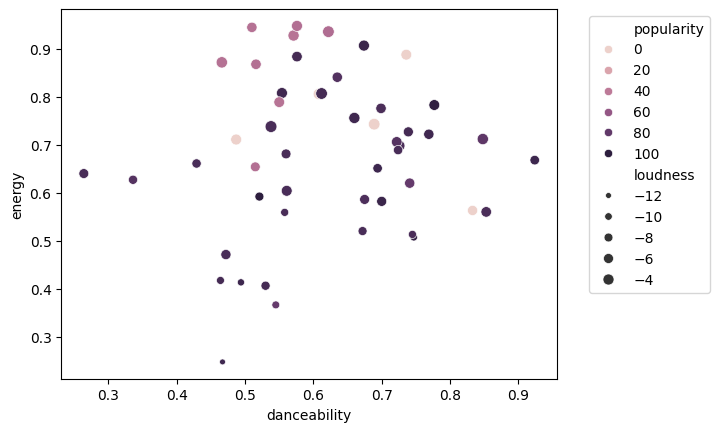
# scatter plot with danceability and energy, colored by popularity, with size as loudness
sns.scatterplot(
    data=df, x="danceability", y="energy", hue="popularity", size="loudness"
)

# Move the legend outside the plot
plt.legend(bbox_to_anchor=(1.05, 1), loc="upper left")
import seaborn as sns

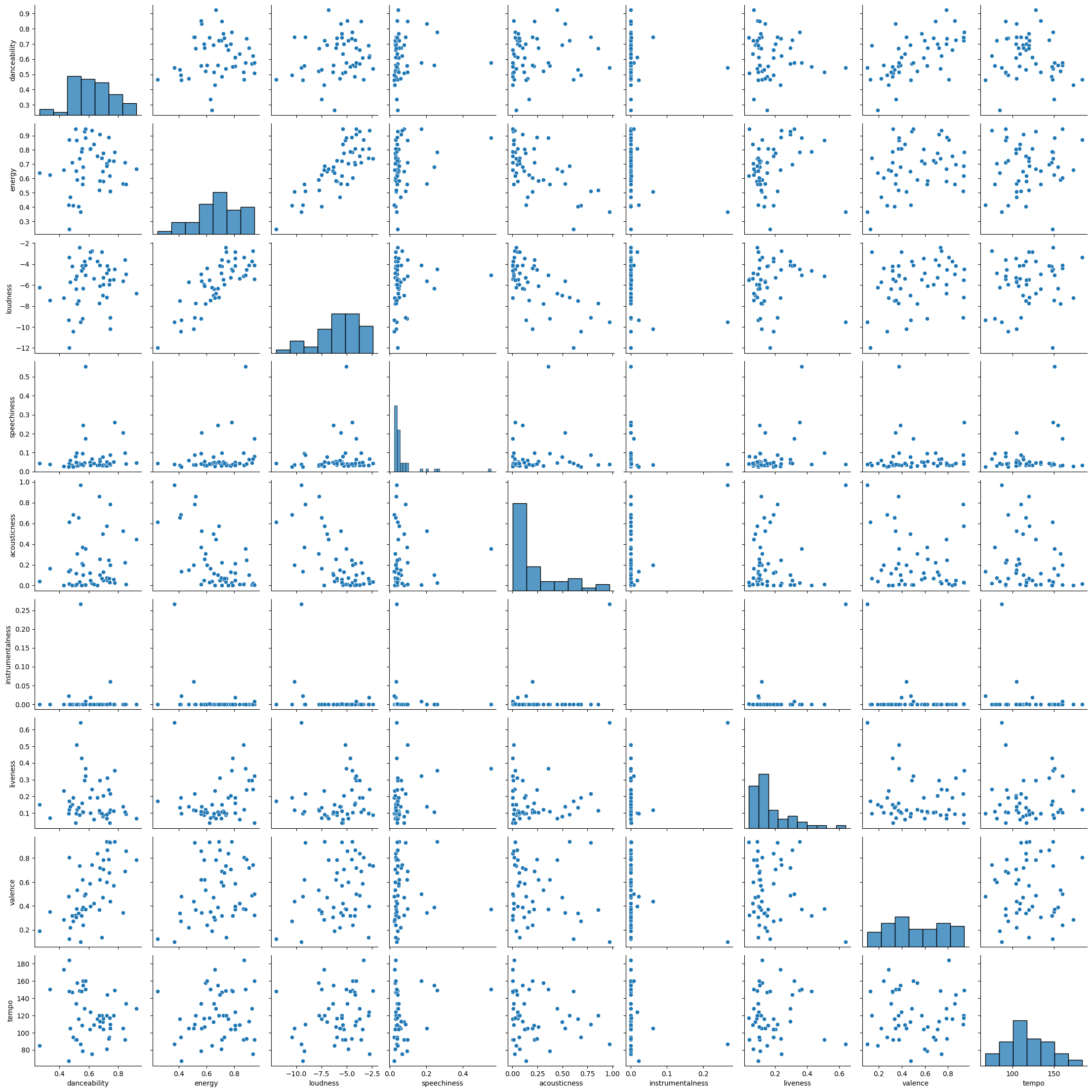
sns.pairplot(
    top50_playlist.audio_features_df[
        [
            "danceability",
            "energy",
            "loudness",
            "speechiness",
            "acousticness",
            "instrumentalness",
            "liveness",
            "valence",
            "tempo",
        ]
    ]
)
<seaborn.axisgrid.PairGrid at 0x10ac069b0>
Audio analysis
audio_analysis = top50_playlist.audio_analysis(next(iter(top50_playlist)))
type(audio_analysis)
dict
list(audio_analysis)
['meta', 'track', 'bars', 'beats', 'sections', 'segments', 'tatums']
audio_analysis["meta"]
{'analyzer_version': '4.0.0',
 'platform': 'Linux',
 'detailed_status': 'OK',
 'status_code': 0,
 'timestamp': 1723785476,
 'analysis_time': 5.78793,
 'input_process': 'libvorbisfile L+R 44100->22050'}
audio_analysis["track"]
{'num_samples': 5549270,
 'duration': 251.66757,
 'sample_md5': '',
 'offset_seconds': 0,
 'window_seconds': 0,
 'analysis_sample_rate': 22050,
 'analysis_channels': 1,
 'end_of_fade_in': 0.2034,
 'start_of_fade_out': 241.98096,
 'loudness': -7.863,
 'tempo': 158.005,
 'tempo_confidence': 0.501,
 'time_signature': 3,
 'time_signature_confidence': 1.0,
 'key': 6,
 'key_confidence': 0.253,
 'mode': 0,
 'mode_confidence': 0.452,
 'codestring': 'eJxVmgcC...twbhuw==',
 'code_version': 3.15,
 'echoprintstring': '...',
 'echoprint_version': 4.12,
 'synchstring': 'eJxVWYmR6zoMa8UlSDx09N...EsF7ZvNGhvn5DzGSYaU=',
 'synch_version': 1.0,
 'rhythmstring': 'eJxdnAmSWzkSQ6..._8hOM4=',
 'rhythm_version': 1.0}
from lkj import truncate_dict_values

print(f"{len(audio_analysis['bars'])=})")
truncate_dict_values(audio_analysis["bars"])
len(audio_analysis['bars'])=211)


[{'start': 1.36936, 'duration': 1.1373, 'confidence': 0.506},
 {'start': 2.50666, 'duration': 1.14286, 'confidence': 0.037}]
print(f"{len(audio_analysis['beats'])=})")
truncate_dict_values(audio_analysis["beats"])
len(audio_analysis['beats'])=639)


[{'start': 0.598, 'duration': 0.39454, 'confidence': 0.786},
 {'start': 0.99254, 'duration': 0.37682, 'confidence': 0.461}]
print(f"{len(audio_analysis['sections'])=})")
truncate_dict_values(audio_analysis["sections"])
len(audio_analysis['sections'])=10)


[{'start': 0.0,
  'duration': 9.72348,
  'confidence': 1.0,
  'loudness': -22.269,
  'tempo': 158.348,
  'tempo_confidence': 0.353,
  'key': 1,
  'key_confidence': 0.03,
  'mode': 0,
  'mode_confidence': 0.567,
  'time_signature': 3,
  'time_signature_confidence': 1.0},
 {'start': 9.72348,
  'duration': 29.24311,
  'confidence': 0.606,
  'loudness': -11.712,
  'tempo': 158.114,
  'tempo_confidence': 0.364,
  'key': 9,
  'key_confidence': 0.217,
  'mode': 1,
  'mode_confidence': 0.472,
  'time_signature': 3,
  'time_signature_confidence': 1.0}]
print(f"{len(audio_analysis['segments'])=})")
truncate_dict_values(audio_analysis["segments"])
len(audio_analysis['segments'])=780)


[{'start': 0.0,
  'duration': 0.2034,
  'confidence': 0.0,
  'loudness_start': -60.0,
  'loudness_max_time': 0.0,
  'loudness_max': -60.0,
  'loudness_end': 0.0,
  'pitches': [1.0, 1.0],
  'timbre': [0.0, 171.13]},
 {'start': 0.2034,
  'duration': 0.41234,
  'confidence': 1.0,
  'loudness_start': -60.0,
  'loudness_max_time': 0.05445,
  'loudness_max': -22.196,
  'loudness_end': 0.0,
  'pitches': [0.082, 0.554],
  'timbre': [33.758, 53.096]}]
print(f"{len(audio_analysis['tatums'])=})")
truncate_dict_values(audio_analysis["tatums"])
len(audio_analysis['tatums'])=1278)


[{'start': 0.598, 'duration': 0.19727, 'confidence': 0.786},
 {'start': 0.79527, 'duration': 0.19727, 'confidence': 0.786}]
from lkj import truncate_dict_values

truncate_dict_values(audio_analysis, max_list_size=2)
{'meta': {'analyzer_version': '4.0.0',
  'platform': 'Linux',
  'detailed_status': 'OK',
  'status_code': 0,
  'timestamp': 1476616359,
  'analysis_time': 109.6869,
  'input_process': 'libvorbisfile L+R 44100->22050'},
 'track': {'num_samples': 15594936,
  'duration': 707.25336,
  'sample_md5': '',
  'offset_seconds': 0,
  'window_seconds': 0,
  'analysis_sample_rate': 22050,
  'analysis_channels': 1,
  'end_of_fade_in': 2.82703,
  'start_of_fade_out': 693.6381,
  'loudness': -10.355,
  'tempo': 106.396,
  'tempo_confidence': 0.595,
  'time_signature': 4,
  'time_signature_confidence': 0.904,
  'key': 5,
  'key_confidence': 0.049,
  'mode': 0,
  'mode_confidence': 0.228,
  'codestring': 'eJw1nQmS5LqOBK9SRxB38v4X63BHtv2...y2bmBs1qBYvtiECKLDlx_oH4Y3DGg==',
  'code_version': 3.15,
  'echoprintstring': 'eJzcnQ2u7DhzZLckUaRILkf82_8S5oT...av23MzLxruBTa5AgsAdSL_-A1nrtTE=',
  'echoprint_version': 4.12,
  'synchstring': 'eJx9mAuS5DgIRK_iI1h_6_4XW_IlclV...OPN79PfjNMgH2A-QVgPFZR_AHMBU_o=',
  'synch_version': 1.0,
  'rhythmstring': 'eJyNnVmSJEmOQ68SR9B9uf_FxogHqme...EXgaMRt5h7-gy4yclWmWjb8_wC55QRT',
  'rhythm_version': 1.0},
 'bars': [{'start': 2.64511, 'duration': 2.23768, 'confidence': 0.825},
  {'start': 4.88279, 'duration': 2.16451, 'confidence': 0.352}],
 'beats': [{'start': 0.9181, 'duration': 0.58698, 'confidence': 0.683},
  {'start': 1.50508, 'duration': 0.57369, 'confidence': 0.572}],
 'sections': [{'start': 0.0,
   'duration': 11.51788,
   'confidence': 1.0,
   'loudness': -20.409,
   'tempo': 108.121,
   'tempo_confidence': 0.728,
   'key': 6,
   'key_confidence': 0.162,
   'mode': 1,
   'mode_confidence': 0.478,
   'time_signature': 4,
   'time_signature_confidence': 0.1},
  {'start': 11.51788,
   'duration': 30.61314,
   'confidence': 0.731,
   'loudness': -12.171,
   'tempo': 107.882,
   'tempo_confidence': 0.499,
   'key': 10,
   'key_confidence': 0.429,
   'mode': 0,
   'mode_confidence': 0.387,
   'time_signature': 4,
   'time_signature_confidence': 0.467}],
 'segments': [{'start': 0.0,
   'duration': 0.60957,
   'confidence': 0.0,
   'loudness_start': -60.0,
   'loudness_max_time': 0.5863,
   'loudness_max': -56.103,
   'loudness_end': 0.0,
   'pitches': [0.8, 0.511],
   'timbre': [0.116, 169.016]},
  {'start': 0.60957,
   'duration': 0.60376,
   'confidence': 1.0,
   'loudness_start': -55.895,
   'loudness_max_time': 0.03504,
   'loudness_max': -36.652,
   'loudness_end': 0.0,
   'pitches': [0.434, 0.38],
   'timbre': [13.111, 157.189]}],
 'tatums': [{'start': 0.9181, 'duration': 0.29349, 'confidence': 0.683},
  {'start': 1.21159, 'duration': 0.29349, 'confidence': 0.683}]}
sung
Music data access. Mainly sources from spotify and wikipedia.
Install
To install: pip install sung
For most tools, you’ll also need a spotify
export SPOTIFY_API_CLIENT_ID="your_api_client_id"
export SPOTIFY_API_CLIENT_SECRET="your_api_client_secrete"
export SPOTIPY_REDIRECT_URI="http://127.0.0.1:8000/callback"
export SPOTIPY_CLIENT_ID="$SPOTIFY_API_CLIENT_ID"
export SPOTIPY_CLIENT_SECRET="$SPOTIFY_API_CLIENT_SECRET"
Spotify API credentials?
To obtain Spotify API credentials, follow these steps: 1. Create a Spotify Developer Account: • Visit the Spotify Developer Dashboard. • Log in with your Spotify account or create a new one. 2. Register a New Application: • Click on “Create an App.” • Provide an App Name and App Description. • Agree to the Developer Terms of Service. • Click “Create.” 3. Retrieve Client ID and Client Secret: • After creating the app, you’ll be directed to the app’s dashboard. • Here, you’ll find your Client ID and Client Secret. • Keep these credentials secure; they are essential for API authentication. 4. Set Redirect URIs (if applicable): • In your app settings, click “Edit Settings.” • Under “Redirect URIs,” add the URIs where Spotify should redirect after authentication. • This is crucial for certain authorization flows.
For detailed information on authorization flows and using your credentials, refer to Spotify’s Authorization Guide.
Ensure you handle your Client Secret securely and adhere to Spotify’s Developer Terms of Service.
Using the sung.base Module to Search Tracks and Create a Playlist
In this example, we’ll:
Search for tracks using
Tracks.search.See the search results from the dict-like
tracksinstanceDisplay the search results in a pandas DataFrame.
Create a playlist called “my_test_playlist” with the selected tracks.
Get the URL of the newly created playlist.
Delete a playlist
Instantiate a
Playlistobject using a URL.Look at audio features aof this playlist
Import the necessary classes from the sung.base module
from sung.base import Tracks, Playlist
Search for tracks with the query ‘Love’, limiting the results to 7 This will return a Tracks object containing the search results
tracks = Tracks.search(query="Love", limit=7)
list(tracks)
['1vrd6UOGamcKNGnSHJQlSt',
 '3CeCwYWvdfXbZLXFhBrbnf',
 '1dGr1c8CrMLDpV6mPbImSI',
 '0u2P5u6lvoDfwTYjAADbn4',
 '6nGeLlakfzlBcFdZXteDq7',
 '6dBUzqjtbnIa1TwYbyw5CM',
 '7hR22TOX3RorxJPcsz5Wbo']
You can also make a tracks object by passing a list of track IDs or urls
track_ids = [
    "1vrd6UOGamcKNGnSHJQlSt",
    "3CeCwYWvdfXbZLXFhBrbnf",
    "1dGr1c8CrMLDpV6mPbImSI",
    "0u2P5u6lvoDfwTYjAADbn4",
    "https://open.spotify.com/track/6nGeLlakfzlBcFdZXteDq7",  # url
    "https://open.spotify.com/track/6dBUzqjtbnIa1TwYbyw5CM",  # url
    "spotify:track:7hR22TOX3RorxJPcsz5Wbo",  # uri
]

tracks = Tracks(track_ids)
tracks is a Mapping (that means “dict-like”), so you can do what you do with dicts…
Like listing the tracks’ keys (IDs)
list(tracks)
['1vrd6UOGamcKNGnSHJQlSt',
 '3CeCwYWvdfXbZLXFhBrbnf',
 '1dGr1c8CrMLDpV6mPbImSI',
 '0u2P5u6lvoDfwTYjAADbn4',
 '6nGeLlakfzlBcFdZXteDq7',
 '6dBUzqjtbnIa1TwYbyw5CM',
 '7hR22TOX3RorxJPcsz5Wbo']
Like Accessing the value of a track for a given key. The value is a bunch of metadata about the track.
track_metadata = tracks["1dGr1c8CrMLDpV6mPbImSI"]  # get metadata of track via it's id
assert isinstance(track_metadata, dict)
sorted(track_metadata)
['album',
 'artists',
 'available_markets',
 'disc_number',
 'duration_ms',
 'explicit',
 'external_ids',
 'external_urls',
 'href',
 'id',
 'is_local',
 'name',
 'popularity',
 'preview_url',
 'track_number',
 'type',
 'uri']
But we also have extras over normal dicts.
We can get metadata of a track via it’s index:
track_metadata = tracks[2] # get metadata of track via it's id
We can get a sublist of track metadatas from a list of ids.
list_of_track_metadatas = tracks[
    ["6dBUzqjtbnIa1TwYbyw5CM", "1vrd6UOGamcKNGnSHJQlSt"]
]  # get metadata of tracks via a list of ids
We can also get a sublist using slicing.
list_of_track_metadatas = tracks[2:4] # get metadata of tracks via a slice of ids
Display the search results in a pandas DataFrame
The dataframe method converts the track metadata into a DataFrame for easy viewing.
(Note, you can also use the tracks.dataframe(keys, front_columns=…) to retrieve a data table with more control.)
If you have pandas installed, you can get the meta data as a table (dataframe).
tracks.data
| name | duration_ms | popularity | explicit | id | album | artists | available_markets | disc_number | external_ids | external_urls | href | is_local | preview_url | track_number | type | uri | |
|---|---|---|---|---|---|---|---|---|---|---|---|---|---|---|---|---|---|
| id | |||||||||||||||||
| 1vrd6UOGamcKNGnSHJQlSt | Love Story | 235266 | 62 | False | 1vrd6UOGamcKNGnSHJQlSt | {'album_type': 'album', 'artists': [{'external... | [{'external_urls': {'spotify': 'https://open.s... | [CA, US] | 1 | {'isrc': 'USCJY0803275'} | {'spotify': 'https://open.spotify.com/track/1v... | https://api.spotify.com/v1/tracks/1vrd6UOGamcK... | False | https://p.scdn.co/mp3-preview/7bc39c6033766fc8... | 3 | track | spotify:track:1vrd6UOGamcKNGnSHJQlSt |
| 3CeCwYWvdfXbZLXFhBrbnf | Love Story (Taylor’s Version) | 235766 | 76 | False | 3CeCwYWvdfXbZLXFhBrbnf | {'album_type': 'single', 'artists': [{'externa... | [{'external_urls': {'spotify': 'https://open.s... | [AR, AU, AT, BE, BO, BR, BG, CA, CL, CO, CR, C... | 1 | {'isrc': 'USUG12100342'} | {'spotify': 'https://open.spotify.com/track/3C... | https://api.spotify.com/v1/tracks/3CeCwYWvdfXb... | False | https://p.scdn.co/mp3-preview/b2c1ed4794591a62... | 1 | track | spotify:track:3CeCwYWvdfXbZLXFhBrbnf |
| 1dGr1c8CrMLDpV6mPbImSI | Lover | 221306 | 84 | False | 1dGr1c8CrMLDpV6mPbImSI | {'album_type': 'album', 'artists': [{'external... | [{'external_urls': {'spotify': 'https://open.s... | [AR, AU, AT, BE, BO, BR, BG, CA, CL, CO, CR, C... | 1 | {'isrc': 'USUG11901473'} | {'spotify': 'https://open.spotify.com/track/1d... | https://api.spotify.com/v1/tracks/1dGr1c8CrMLD... | False | https://p.scdn.co/mp3-preview/aad996e106de5278... | 3 | track | spotify:track:1dGr1c8CrMLDpV6mPbImSI |
| 0u2P5u6lvoDfwTYjAADbn4 | lovely (with Khalid) | 200185 | 86 | False | 0u2P5u6lvoDfwTYjAADbn4 | {'album_type': 'single', 'artists': [{'externa... | [{'external_urls': {'spotify': 'https://open.s... | [AR, AU, AT, BE, BO, BR, BG, CA, CL, CO, CR, C... | 1 | {'isrc': 'USUM71804190'} | {'spotify': 'https://open.spotify.com/track/0u... | https://api.spotify.com/v1/tracks/0u2P5u6lvoDf... | False | https://p.scdn.co/mp3-preview/18b3cbbad11e488c... | 1 | track | spotify:track:0u2P5u6lvoDfwTYjAADbn4 |
| 6nGeLlakfzlBcFdZXteDq7 | Love Story | 316280 | 74 | False | 6nGeLlakfzlBcFdZXteDq7 | {'album_type': 'album', 'artists': [{'external... | [{'external_urls': {'spotify': 'https://open.s... | [AR, AU, AT, BE, BO, BR, BG, CA, CL, CO, CR, C... | 1 | {'isrc': 'FRUM71400048'} | {'spotify': 'https://open.spotify.com/track/6n... | https://api.spotify.com/v1/tracks/6nGeLlakfzlB... | False | https://p.scdn.co/mp3-preview/677f771b1fc30024... | 3 | track | spotify:track:6nGeLlakfzlBcFdZXteDq7 |
| 6dBUzqjtbnIa1TwYbyw5CM | Lovers Rock | 213920 | 85 | False | 6dBUzqjtbnIa1TwYbyw5CM | {'album_type': 'album', 'artists': [{'external... | [{'external_urls': {'spotify': 'https://open.s... | [AR, AU, AT, BE, BO, BR, BG, CA, CL, CO, CR, C... | 1 | {'isrc': 'USHM21438143'} | {'spotify': 'https://open.spotify.com/track/6d... | https://api.spotify.com/v1/tracks/6dBUzqjtbnIa... | False | https://p.scdn.co/mp3-preview/922a42db5aa8f8d3... | 9 | track | spotify:track:6dBUzqjtbnIa1TwYbyw5CM |
| 7hR22TOX3RorxJPcsz5Wbo | Love Somebody | 204828 | 86 | False | 7hR22TOX3RorxJPcsz5Wbo | {'album_type': 'single', 'artists': [{'externa... | [{'external_urls': {'spotify': 'https://open.s... | [AR, AU, AT, BE, BO, BR, BG, CA, CL, CO, CR, C... | 1 | {'isrc': 'USUG12406387'} | {'spotify': 'https://open.spotify.com/track/7h... | https://api.spotify.com/v1/tracks/7hR22TOX3Ror... | False | https://p.scdn.co/mp3-preview/00b94e332ed40625... | 1 | track | spotify:track:7hR22TOX3RorxJPcsz5Wbo |
Make a playlist
Create a new playlist named ‘my_test_playlist’ with the selected tracks The create_from_track_list class method creates a new playlist with the given tracks
playlist = Playlist.create_from_track_list(
    track_list=selected_track_ids,
    playlist_name='my_test_playlist'
)
print(f"
Playlist '{playlist.playlist_id}' created successfully.")
Playlist '7BZcFvIWUnVzvZ5wpVt9cD' created successfully.
Get the playlist URL of the newly created playlist (go check it out!)
playlist.playlist_url
'https://open.spotify.com/playlist/7BZcFvIWUnVzvZ5wpVt9cD'
Delete a playlist
We purposely tried to make deleting a playlist not as easy as the other actions.
So we didn’t attach a delete method to the playlist instance, but put this in a
separate function you have to import.
Also, we made that function verbose, and asking for confirmation by default.
(But there’s arguments to control that, so you can use functools.partial to
make your own cowboy (not speaking and not asking for permission) version).
from sung import delete_playlist

delete_playlist(playlist.playlist_id)
Instantiate a Playlist object using a URL. This allows you to interact with the playlist, such as accessing its tracks.
top50_global_url = (
    "https://open.spotify.com/playlist/37i9dQZEVXbMDoHDwVN2tF?si=d6e0c7bc8f59473b"
)
top50_playlist = Playlist(top50_global_url)
df = top50_playlist.data
df["first_artist"] = df["artists"].apply(lambda x: x[0]["name"])
df["name_and_first_artist"] = df["name"] + " - " + df["first_artist"]
top_5_tracks = top50_playlist.data.iloc[:5].name_and_first_artist
top_5_tracks
id
2plbrEY59IikOBgBGLjaoe          Die With A Smile - Lady Gaga
5vNRhkKd0yEAg8suGBpjeY                           APT. - ROSÉ
6dOtVTDdiauQNBQEDOtlAB    BIRDS OF A FEATHER - Billie Eilish
7ne4VBA60CxGM75vw0EYad        That’s So True - Gracie Abrams
7tI8dRuH2Yc6RuoTjxo4dU                           Who - Jimin
Name: name_and_first_artist, dtype: object
Audio features
import pandas as pd

print(f"{top50_playlist.audio_features_df.shape=}")
top50_playlist.audio_features_df.iloc[0]
top50_playlist.audio_features_df.shape=(50, 17)


danceability                                                    0.521
energy                                                          0.592
key                                                                 6
loudness                                                       -7.777
mode                                                                0
speechiness                                                    0.0304
acousticness                                                    0.308
instrumentalness                                                  0.0
liveness                                                        0.122
valence                                                         0.535
tempo                                                         157.969
type                                                   audio_features
uri                              spotify:track:2plbrEY59IikOBgBGLjaoe
track_href          https://api.spotify.com/v1/tracks/2plbrEY59Iik...
analysis_url        https://api.spotify.com/v1/audio-analysis/2plb...
duration_ms                                                    251668
time_signature                                                      3
Name: 2plbrEY59IikOBgBGLjaoe, dtype: object
import seaborn as sns
from matplotlib import pyplot as plt

df = pd.merge(
    top50_playlist.data,
    top50_playlist.audio_features_df,
    left_index=True,
    right_index=True,
)
# scatter plot with danceability and energy, colored by popularity, with size as loudness
sns.scatterplot(
    data=df, x="danceability", y="energy", hue="popularity", size="loudness"
)

# Move the legend outside the plot
plt.legend(bbox_to_anchor=(1.05, 1), loc="upper left")
import seaborn as sns

sns.pairplot(
    top50_playlist.audio_features_df[
        [
            "danceability",
            "energy",
            "loudness",
            "speechiness",
            "acousticness",
            "instrumentalness",
            "liveness",
            "valence",
            "tempo",
        ]
    ]
)
<seaborn.axisgrid.PairGrid at 0x10ac069b0>
Audio analysis
audio_analysis = top50_playlist.audio_analysis(next(iter(top50_playlist)))
type(audio_analysis)
dict
list(audio_analysis)
['meta', 'track', 'bars', 'beats', 'sections', 'segments', 'tatums']
audio_analysis["meta"]
{'analyzer_version': '4.0.0',
 'platform': 'Linux',
 'detailed_status': 'OK',
 'status_code': 0,
 'timestamp': 1723785476,
 'analysis_time': 5.78793,
 'input_process': 'libvorbisfile L+R 44100->22050'}
audio_analysis["track"]
{'num_samples': 5549270,
 'duration': 251.66757,
 'sample_md5': '',
 'offset_seconds': 0,
 'window_seconds': 0,
 'analysis_sample_rate': 22050,
 'analysis_channels': 1,
 'end_of_fade_in': 0.2034,
 'start_of_fade_out': 241.98096,
 'loudness': -7.863,
 'tempo': 158.005,
 'tempo_confidence': 0.501,
 'time_signature': 3,
 'time_signature_confidence': 1.0,
 'key': 6,
 'key_confidence': 0.253,
 'mode': 0,
 'mode_confidence': 0.452,
 'codestring': 'eJxVmgcC...twbhuw==',
 'code_version': 3.15,
 'echoprintstring': '...',
 'echoprint_version': 4.12,
 'synchstring': 'eJxVWYmR6zoMa8UlSDx09N...EsF7ZvNGhvn5DzGSYaU=',
 'synch_version': 1.0,
 'rhythmstring': 'eJxdnAmSWzkSQ6..._8hOM4=',
 'rhythm_version': 1.0}
from lkj import truncate_dict_values

print(f"{len(audio_analysis['bars'])=})")
truncate_dict_values(audio_analysis["bars"])
len(audio_analysis['bars'])=211)


[{'start': 1.36936, 'duration': 1.1373, 'confidence': 0.506},
 {'start': 2.50666, 'duration': 1.14286, 'confidence': 0.037}]
print(f"{len(audio_analysis['beats'])=})")
truncate_dict_values(audio_analysis["beats"])
len(audio_analysis['beats'])=639)


[{'start': 0.598, 'duration': 0.39454, 'confidence': 0.786},
 {'start': 0.99254, 'duration': 0.37682, 'confidence': 0.461}]
print(f"{len(audio_analysis['sections'])=})")
truncate_dict_values(audio_analysis["sections"])
len(audio_analysis['sections'])=10)


[{'start': 0.0,
  'duration': 9.72348,
  'confidence': 1.0,
  'loudness': -22.269,
  'tempo': 158.348,
  'tempo_confidence': 0.353,
  'key': 1,
  'key_confidence': 0.03,
  'mode': 0,
  'mode_confidence': 0.567,
  'time_signature': 3,
  'time_signature_confidence': 1.0},
 {'start': 9.72348,
  'duration': 29.24311,
  'confidence': 0.606,
  'loudness': -11.712,
  'tempo': 158.114,
  'tempo_confidence': 0.364,
  'key': 9,
  'key_confidence': 0.217,
  'mode': 1,
  'mode_confidence': 0.472,
  'time_signature': 3,
  'time_signature_confidence': 1.0}]
print(f"{len(audio_analysis['segments'])=})")
truncate_dict_values(audio_analysis["segments"])
len(audio_analysis['segments'])=780)


[{'start': 0.0,
  'duration': 0.2034,
  'confidence': 0.0,
  'loudness_start': -60.0,
  'loudness_max_time': 0.0,
  'loudness_max': -60.0,
  'loudness_end': 0.0,
  'pitches': [1.0, 1.0],
  'timbre': [0.0, 171.13]},
 {'start': 0.2034,
  'duration': 0.41234,
  'confidence': 1.0,
  'loudness_start': -60.0,
  'loudness_max_time': 0.05445,
  'loudness_max': -22.196,
  'loudness_end': 0.0,
  'pitches': [0.082, 0.554],
  'timbre': [33.758, 53.096]}]
print(f"{len(audio_analysis['tatums'])=})")
truncate_dict_values(audio_analysis["tatums"])
len(audio_analysis['tatums'])=1278)


[{'start': 0.598, 'duration': 0.19727, 'confidence': 0.786},
 {'start': 0.79527, 'duration': 0.19727, 'confidence': 0.786}]
from lkj import truncate_dict_values

truncate_dict_values(audio_analysis, max_list_size=2)
{'meta': {'analyzer_version': '4.0.0',
  'platform': 'Linux',
  'detailed_status': 'OK',
  'status_code': 0,
  'timestamp': 1476616359,
  'analysis_time': 109.6869,
  'input_process': 'libvorbisfile L+R 44100->22050'},
 'track': {'num_samples': 15594936,
  'duration': 707.25336,
  'sample_md5': '',
  'offset_seconds': 0,
  'window_seconds': 0,
  'analysis_sample_rate': 22050,
  'analysis_channels': 1,
  'end_of_fade_in': 2.82703,
  'start_of_fade_out': 693.6381,
  'loudness': -10.355,
  'tempo': 106.396,
  'tempo_confidence': 0.595,
  'time_signature': 4,
  'time_signature_confidence': 0.904,
  'key': 5,
  'key_confidence': 0.049,
  'mode': 0,
  'mode_confidence': 0.228,
  'codestring': 'eJw1nQmS5LqOBK9SRxB38v4X63BHtv2...y2bmBs1qBYvtiECKLDlx_oH4Y3DGg==',
  'code_version': 3.15,
  'echoprintstring': 'eJzcnQ2u7DhzZLckUaRILkf82_8S5oT...av23MzLxruBTa5AgsAdSL_-A1nrtTE=',
  'echoprint_version': 4.12,
  'synchstring': 'eJx9mAuS5DgIRK_iI1h_6_4XW_IlclV...OPN79PfjNMgH2A-QVgPFZR_AHMBU_o=',
  'synch_version': 1.0,
  'rhythmstring': 'eJyNnVmSJEmOQ68SR9B9uf_FxogHqme...EXgaMRt5h7-gy4yclWmWjb8_wC55QRT',
  'rhythm_version': 1.0},
 'bars': [{'start': 2.64511, 'duration': 2.23768, 'confidence': 0.825},
  {'start': 4.88279, 'duration': 2.16451, 'confidence': 0.352}],
 'beats': [{'start': 0.9181, 'duration': 0.58698, 'confidence': 0.683},
  {'start': 1.50508, 'duration': 0.57369, 'confidence': 0.572}],
 'sections': [{'start': 0.0,
   'duration': 11.51788,
   'confidence': 1.0,
   'loudness': -20.409,
   'tempo': 108.121,
   'tempo_confidence': 0.728,
   'key': 6,
   'key_confidence': 0.162,
   'mode': 1,
   'mode_confidence': 0.478,
   'time_signature': 4,
   'time_signature_confidence': 0.1},
  {'start': 11.51788,
   'duration': 30.61314,
   'confidence': 0.731,
   'loudness': -12.171,
   'tempo': 107.882,
   'tempo_confidence': 0.499,
   'key': 10,
   'key_confidence': 0.429,
   'mode': 0,
   'mode_confidence': 0.387,
   'time_signature': 4,
   'time_signature_confidence': 0.467}],
 'segments': [{'start': 0.0,
   'duration': 0.60957,
   'confidence': 0.0,
   'loudness_start': -60.0,
   'loudness_max_time': 0.5863,
   'loudness_max': -56.103,
   'loudness_end': 0.0,
   'pitches': [0.8, 0.511],
   'timbre': [0.116, 169.016]},
  {'start': 0.60957,
   'duration': 0.60376,
   'confidence': 1.0,
   'loudness_start': -55.895,
   'loudness_max_time': 0.03504,
   'loudness_max': -36.652,
   'loudness_end': 0.0,
   'pitches': [0.434, 0.38],
   'timbre': [13.111, 157.189]}],
 'tatums': [{'start': 0.9181, 'duration': 0.29349, 'confidence': 0.683},
  {'start': 1.21159, 'duration': 0.29349, 'confidence': 0.683}]}
Analyze a playlist
from sung import TracksAnalysis, ensure_playlist_id
Initialize the Class with a Playlist ID
# Let's analyze my daughter's playlist...

playlist = (
    "https://open.spotify.com/playlist/4nEeS47ineUShHK2iAVeO0?si=be16c62b664f43f3"
)

ta = TracksAnalysis(playlist)
Note that, alternatively, if you already have a dataframe, you can just give TracksAnalysis that.
Note that it must have been prepared by TracksAnalysis, or at least satisfy the dataframe conditions on the columns.
# import pandas as pd
# df = pd.read_excel("~/Dropbox/_odata/ai_contexts/misc/music/encore_playlist.xlsx")
# ta = TracksAnalysis(df)
Access the Processed Dataframe
ta.df.head()
| name | first_artist | duration_ms | popularity | explicit | album_release_date | album_release_year | added_at_date | url | first_letter | ... | artists | disc_number | track_number | external_ids | external_urls | href | uri | is_local | added_at_datetime | id_y | |
|---|---|---|---|---|---|---|---|---|---|---|---|---|---|---|---|---|---|---|---|---|---|
| id | |||||||||||||||||||||
| 62HY7V5hRKtfIZ7uCYqYqu | The Imperial March (Darth Vader's Theme) | John Williams | 182973 | 0 | False | 1997-01-01 | 1997 | NaN | https://open.spotify.com/track/62HY7V5hRKtfIZ7... | T | ... | [{'external_urls': {'spotify': 'https://open.s... | 2 | 1 | {'isrc': 'USSM10411815'} | {'spotify': 'https://open.spotify.com/track/62... | https://api.spotify.com/v1/tracks/62HY7V5hRKtf... | spotify:track:62HY7V5hRKtfIZ7uCYqYqu | False | NaN | NaN |
| 0mVL6TMwrRqFsLRgoKoAfS | Wimoweh (Mbube) | Yma Sumac | 158440 | 0 | False | 2015-01-28 | 2015 | NaN | https://open.spotify.com/track/0mVL6TMwrRqFsLR... | W | ... | [{'external_urls': {'spotify': 'https://open.s... | 1 | 4 | {'isrc': 'FR0W61497652'} | {'spotify': 'https://open.spotify.com/track/0m... | https://api.spotify.com/v1/tracks/0mVL6TMwrRqF... | spotify:track:0mVL6TMwrRqFsLRgoKoAfS | False | NaN | NaN |
| 3N7aUWtL9EvKrBtmSCxuYW | Mah Na Mah Na | Mahna Mahna and The Two Snowths | 125906 | 10 | False | 2011-01-01 | 2011 | NaN | https://open.spotify.com/track/3N7aUWtL9EvKrBt... | M | ... | [{'external_urls': {'spotify': 'https://open.s... | 1 | 30 | {'isrc': 'USWD11158969'} | {'spotify': 'https://open.spotify.com/track/3N... | https://api.spotify.com/v1/tracks/3N7aUWtL9EvK... | spotify:track:3N7aUWtL9EvKrBtmSCxuYW | False | NaN | NaN |
| 1XieuY2bxCfXNHwSDJQrPs | My Baby Just Cares For Me | Nina Simone | 215706 | 36 | False | 2007-01-01 | 2007 | NaN | https://open.spotify.com/track/1XieuY2bxCfXNHw... | M | ... | [{'external_urls': {'spotify': 'https://open.s... | 1 | 8 | {'isrc': 'USPR38700001'} | {'spotify': 'https://open.spotify.com/track/1X... | https://api.spotify.com/v1/tracks/1XieuY2bxCfX... | spotify:track:1XieuY2bxCfXNHwSDJQrPs | False | NaN | NaN |
| 40Fr7DB1j6RB2DqygQI4LI | Holocaust | Ceza | 207746 | 57 | False | 2004-07-01 | 2004 | NaN | https://open.spotify.com/track/40Fr7DB1j6RB2Dq... | H | ... | [{'external_urls': {'spotify': 'https://open.s... | 1 | 3 | {'isrc': 'TR0640600079'} | {'spotify': 'https://open.spotify.com/track/40... | https://api.spotify.com/v1/tracks/40Fr7DB1j6RB... | spotify:track:40Fr7DB1j6RB2DqygQI4LI | False | NaN | NaN |
5 rows × 29 columns
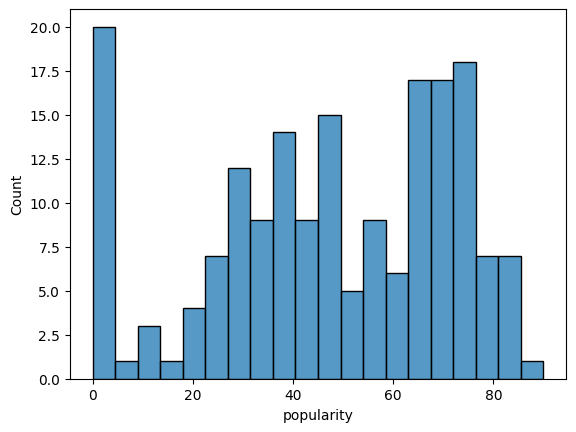
Audio Features Analysis
ta.plot_features_histogram()
ta.plot_features_scatter()
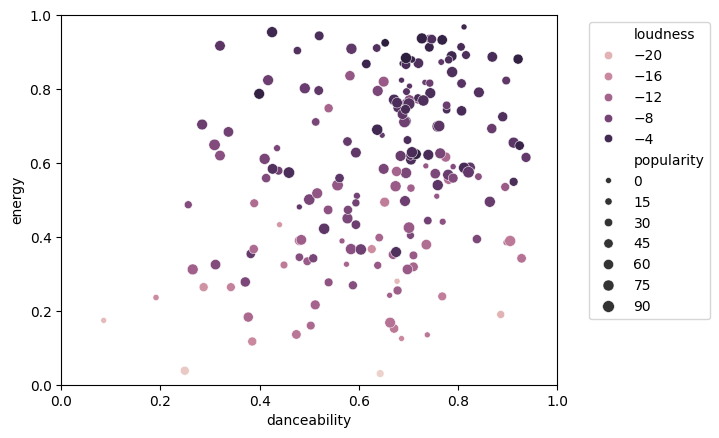
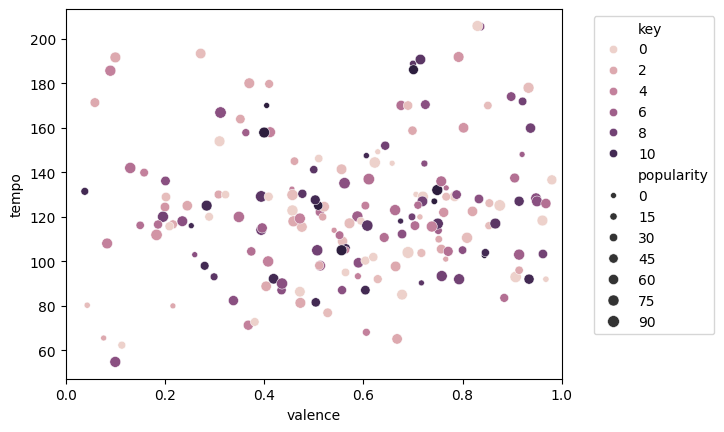
You can choose what fields to map to what plot features (x, y, size and hue).
The names of the audio feature fields with their descriptions, are
from sung.util import spotify_features_fields

spotify_features_fields
{'name': 'The name of the track.',
 'artist': 'The name of the primary artist associated with the track.',
 'album': 'The name of the album in which the track appears.',
 'release_date': 'The release date of the album or single. Format can vary (e.g., YYYY-MM-DD).',
 'duration_ms': "The track's duration in milliseconds.",
 'popularity': 'The popularity of the track, with values ranging from 0 to 100. Higher values indicate greater popularity.',
 'explicit': 'A boolean indicating whether the track contains explicit content.',
 'external_url': 'A dictionary of external URLs, including a link to the track on Spotify.',
 'preview_url': 'A URL to a 30-second preview of the track, if available.',
 'track_number': "The track's position within its album or single. The first track is 1.",
 'album_total_tracks': 'The total number of tracks in the album that contains this track.',
 'available_markets': 'A list of country codes where the track is available.',
 'album_images': 'A list of album cover art images in various sizes, with URLs to access them.',
 'acousticness': 'A confidence measure from 0.0 to 1.0 indicating the likelihood that the track is acoustic. Higher values denote a higher probability. Range: 0.0 to 1.0.',
 'danceability': 'Reflects how suitable a track is for dancing, based on tempo, rhythm stability, beat strength, and overall regularity. Higher values indicate greater danceability. Range: 0.0 to 1.0.',
 'energy': 'Measures the intensity and activity of a track. Energetic tracks feel fast, loud, and noisy. Higher values represent more energy. Range: 0.0 to 1.0.',
 'instrumentalness': 'Predicts whether a track contains no vocals. Higher values suggest a greater likelihood of the track being instrumental. Range: 0.0 to 1.0.',
 'liveness': 'Detects the presence of an audience in the recording. Higher values indicate a higher probability of the track being performed live. Range: 0.0 to 1.0.',
 'loudness': 'The overall loudness of a track in decibels (dB), averaged across the entire track. Useful for comparing the relative loudness of tracks. Typical range: -60 to 0 dB.',
 'speechiness': 'Measures the presence of spoken words in a track. Higher values indicate more speech-like content. Values above 0.66 suggest tracks made entirely of spoken words; values between 0.33 and 0.66 may contain both music and speech; values below 0.33 likely represent music and other non-speech-like tracks. Range: 0.0 to 1.0.',
 'valence': 'Describes the musical positiveness conveyed by a track. Higher values sound more positive (e.g., happy, cheerful), while lower values sound more negative (e.g., sad, angry). Range: 0.0 to 1.0.',
 'tempo': 'The estimated tempo of a track in beats per minute (BPM). Range: 0 to 250 BPM.',
 'key': 'The estimated overall key of the track, represented as an integer corresponding to standard Pitch Class notation (e.g., 0 = C, 1 = C♯/D♭, ..., 11 = B). If no key was detected, the value is -1. Range: -1 to 11.',
 'mode': 'Indicates the modality (major or minor) of a track. Major is represented by 1 and minor by 0. Range: 0 or 1.',
 'time_signature': 'An estimated overall time signature of a track, indicating how many beats are in each bar. Range: 3 to 7.'}
ta.plot_features_scatter(x="valence", y="tempo", hue="key")
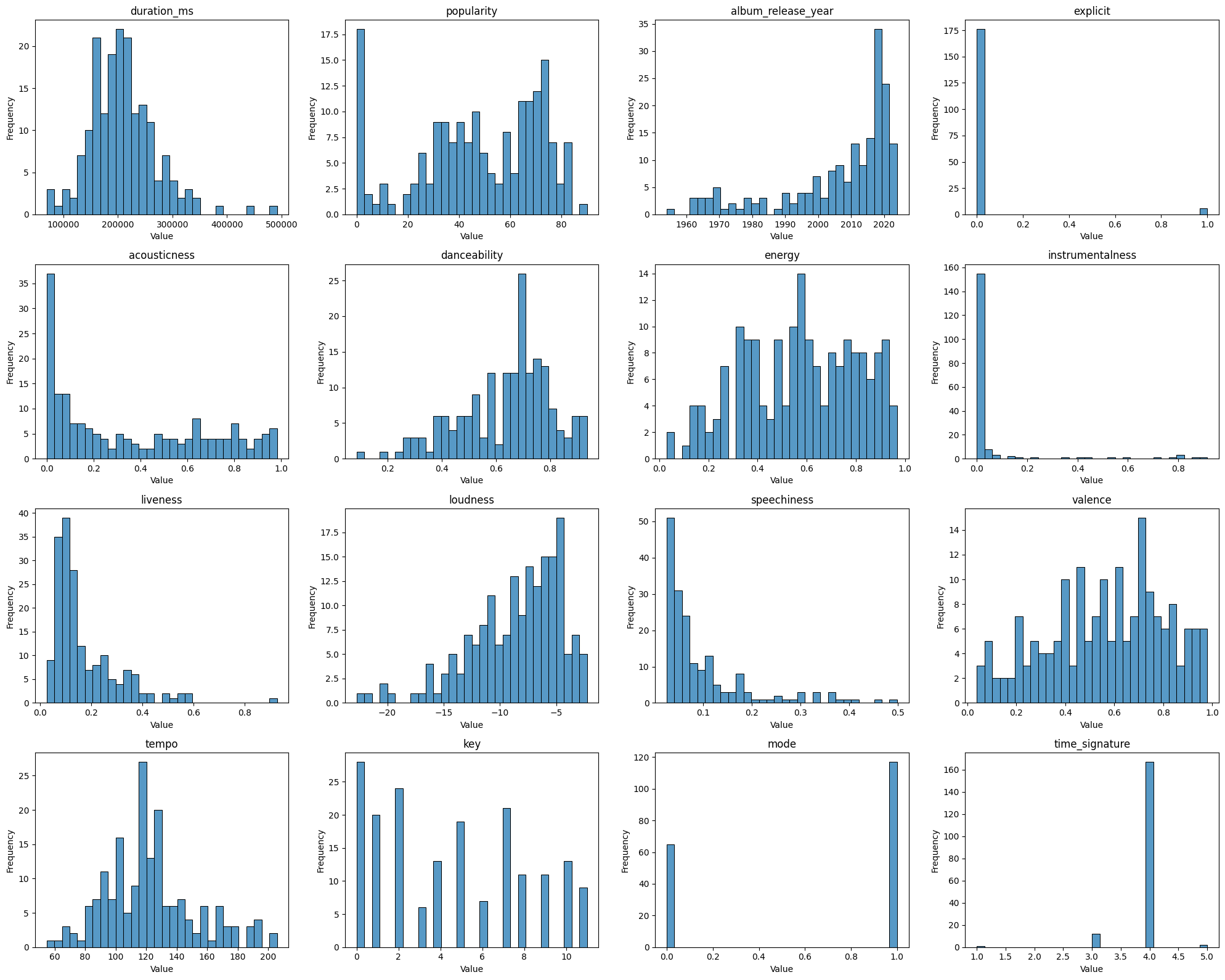
ta.plot_dataframe_distributions()
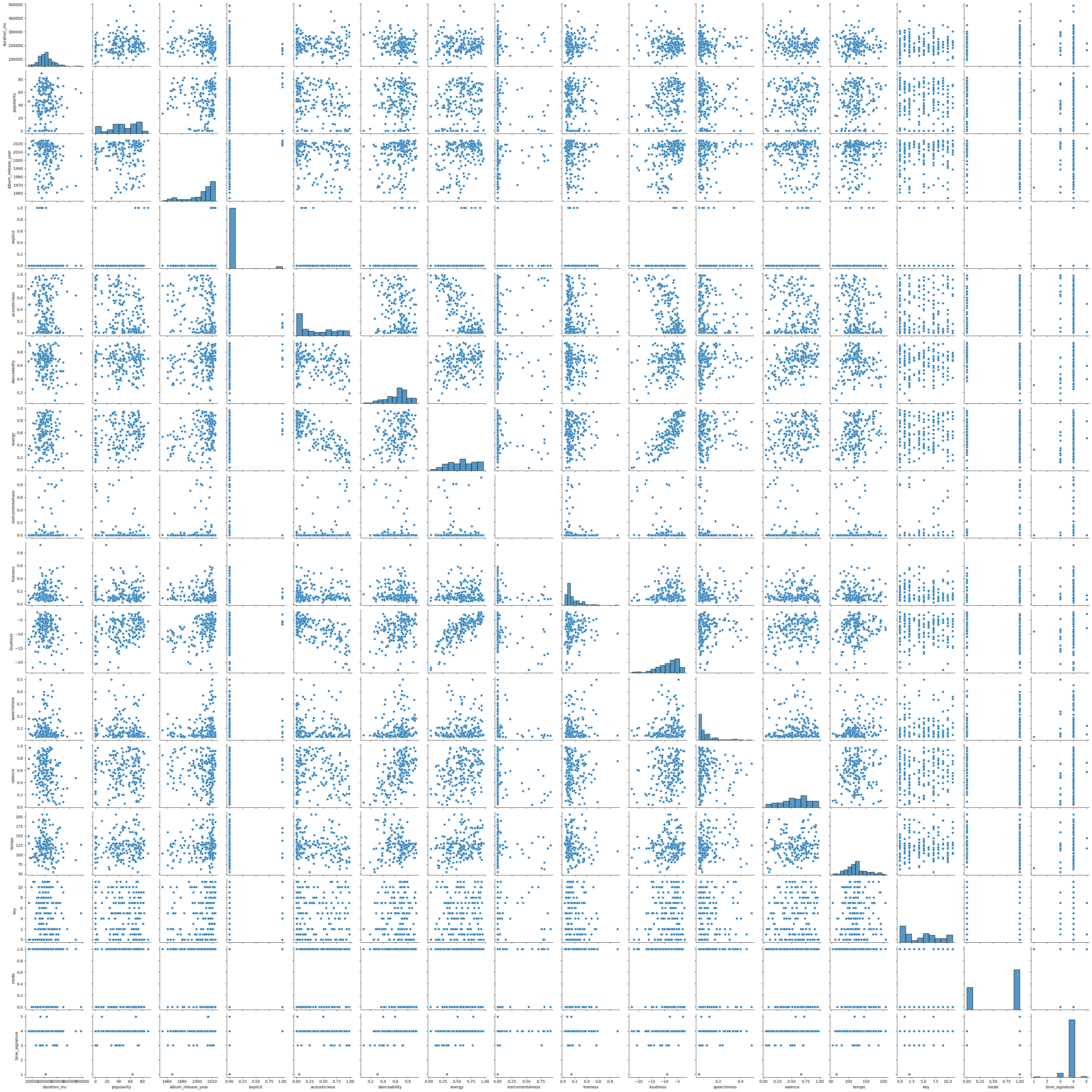
ta.plot_features_pairs()
<seaborn.axisgrid.PairGrid at 0x3291ac1f0>
Metadata Analyses
print(f"Number of songs: {ta.number_of_songs}")
print(f"Number of unique names: {ta.number_of_unique_names}")
Number of songs: 182
Number of unique names: 178
Print Duplicates
ta.print_duplicates()
### Duplicates
|                              |   count |
|:-----------------------------|--------:|
| Houdini                      |       2 |
| Anything You Can Do          |       2 |
| Somebody That I Used to Know |       2 |
| The Bare Necessities         |       2 |
Print Most Popular Songs
ta.print_most_popular_songs(n=20)
| name                                            | first_artist      |   popularity |
|:------------------------------------------------|:------------------|-------------:|
| Espresso                                        | Sabrina Carpenter |           90 |
| exes                                            | Tate McRae        |           83 |
| Sweet Dreams (Are Made of This) - 2005 Remaster | Eurythmics        |           83 |
| Zombie                                          | The Cranberries   |           82 |
| Here Comes The Sun - Remastered 2009            | The Beatles       |           82 |
| Before You Go                                   | Lewis Capaldi     |           81 |
| bad guy                                         | Billie Eilish     |           81 |
| ...Baby One More Time                           | Britney Spears    |           81 |
| Tainted Love                                    | Soft Cell         |           79 |
| Wrecking Ball                                   | Miley Cyrus       |           78 |
| New Rules                                       | Dua Lipa          |           78 |
| Rolling in the Deep                             | Adele             |           77 |
| Kings & Queens                                  | Ava Max           |           77 |
| Easy On Me                                      | Adele             |           77 |
| Roar                                            | Katy Perry        |           77 |
| bellyache                                       | Billie Eilish     |           76 |
| Jolene                                          | Dolly Parton      |           75 |
| Symphony (feat. Zara Larsson)                   | Clean Bandit      |           75 |
| Nice For What                                   | Drake             |           74 |
| bury a friend                                   | Billie Eilish     |           74 |
Print Top Artists
ta.print_top_artists(n=25)
| first_artist       |   count |
|:-------------------|--------:|
| Dua Lipa           |       6 |
| Eminem             |       5 |
| Jacob Collier      |       4 |
| Norris Nuts        |       4 |
| The Beatles        |       4 |
| Hugh Jackman       |       4 |
| Music Together     |       3 |
| Leonard Bernstein  |       3 |
| Julie Andrews      |       3 |
| Walk off the Earth |       3 |
| John Williams      |       3 |
| Billie Eilish      |       3 |
| Anna Kendrick      |       3 |
| Zac Efron          |       2 |
| Clean Bandit       |       2 |
| Adele              |       2 |
| Shakira            |       2 |
| Stromae            |       2 |
| Michael Jackson    |       2 |
| Lin-Manuel Miranda |       2 |
| Caravan Palace     |       2 |
| Queen              |       2 |
| Ynairaly Simo      |       2 |
| Édith Piaf         |       2 |
| Dolly Parton       |       1 |
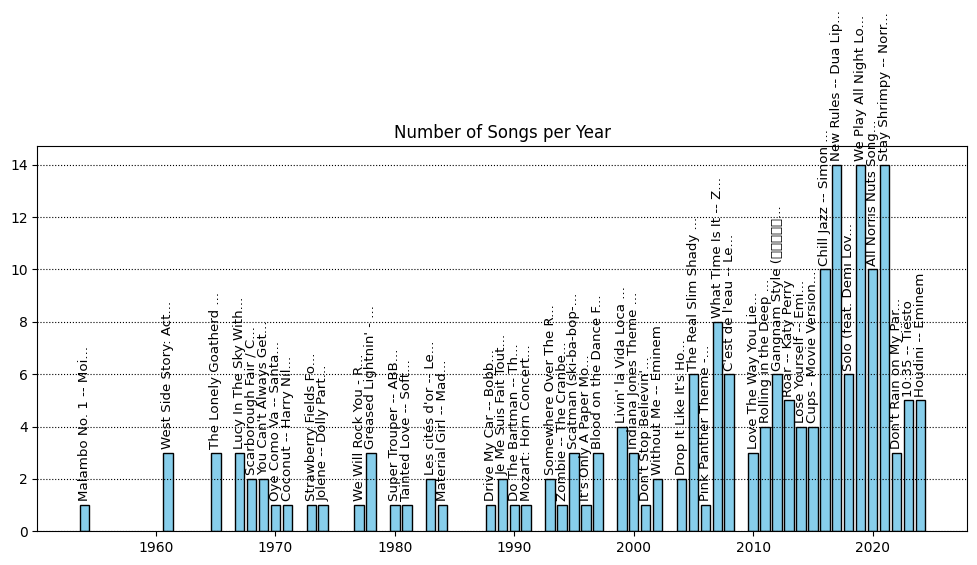
Plot Number of Songs per Release Year
ta.plot_songs_per_year()
/Users/thorwhalen/.pyenv/versions/3.10.13/envs/p10/lib/python3.10/site-packages/IPython/core/pylabtools.py:170: UserWarning: Glyph 44053 (강) missing from font(s) DejaVu Sans.
  fig.canvas.print_figure(bytes_io, **kw)
/Users/thorwhalen/.pyenv/versions/3.10.13/envs/p10/lib/python3.10/site-packages/IPython/core/pylabtools.py:170: UserWarning: Glyph 45224 (남) missing from font(s) DejaVu Sans.
  fig.canvas.print_figure(bytes_io, **kw)
/Users/thorwhalen/.pyenv/versions/3.10.13/envs/p10/lib/python3.10/site-packages/IPython/core/pylabtools.py:170: UserWarning: Glyph 49828 (스) missing from font(s) DejaVu Sans.
  fig.canvas.print_figure(bytes_io, **kw)
/Users/thorwhalen/.pyenv/versions/3.10.13/envs/p10/lib/python3.10/site-packages/IPython/core/pylabtools.py:170: UserWarning: Glyph 53440 (타) missing from font(s) DejaVu Sans.
  fig.canvas.print_figure(bytes_io, **kw)
/Users/thorwhalen/.pyenv/versions/3.10.13/envs/p10/lib/python3.10/site-packages/IPython/core/pylabtools.py:170: UserWarning: Glyph 51068 (일) missing from font(s) DejaVu Sans.
  fig.canvas.print_figure(bytes_io, **kw)
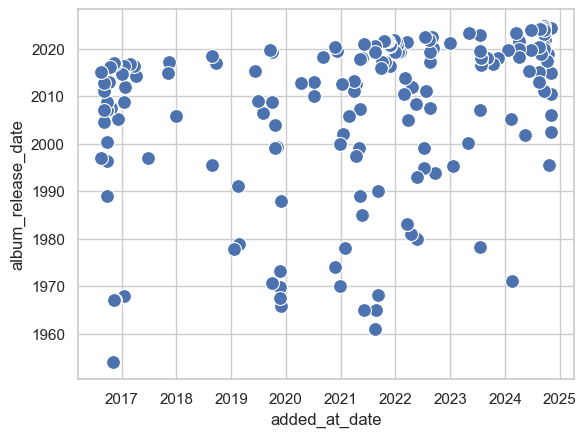
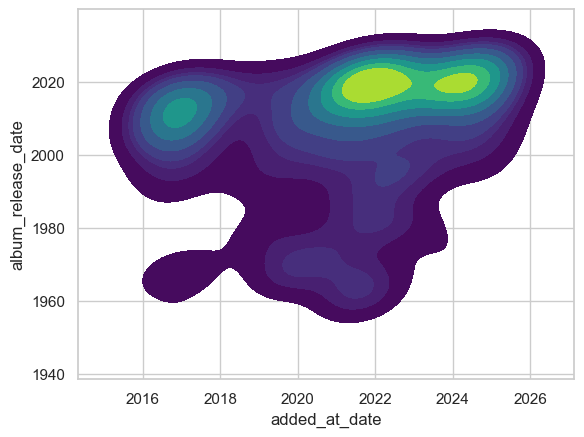
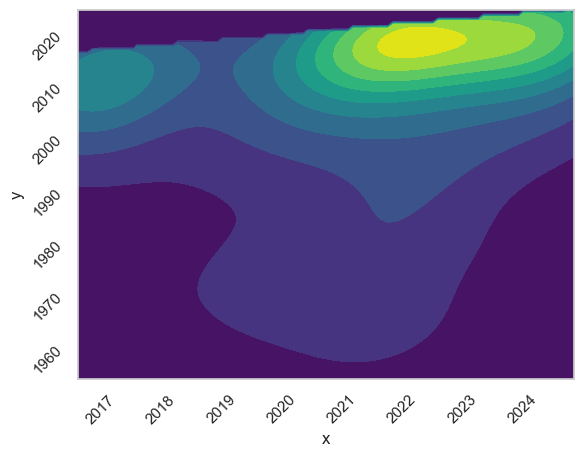
Plot Added Date vs. Release Date
ta.plot_added_vs_release_dates()
ta.plot_added_vs_release_kde()
ta.plot_added_vs_release_kde_boundary()
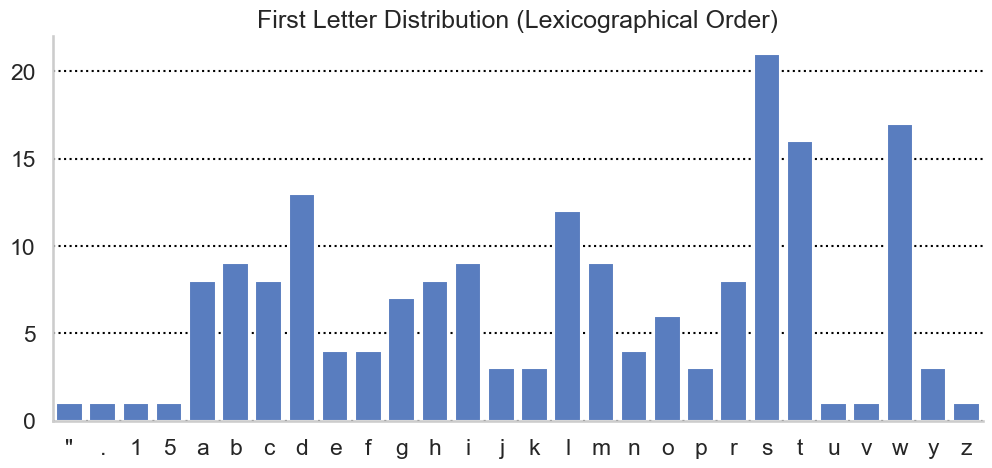
Plot First Letter Distribution
ta.plot_first_letter_distribution(sort_by="lexicographical")
ta.plot_first_letter_distribution(sort_by="count")
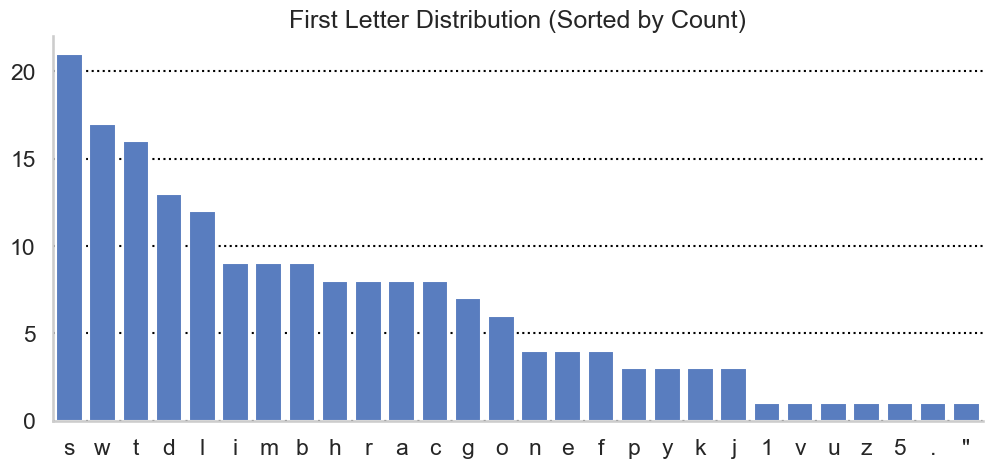
Print Top Tracks by Starting Letter
ta.print_top_names_by_letter(n=5)
L (5 tracks):
  - (74) Levitating
  - (73) Livin' la Vida Loca
  - (63) Lucy In The Sky With Diamonds - Remastered 2009
  - (58) La Vie en rose
  - (50) Lose Yourself
W (5 tracks):
  - (78) Wrecking Ball
  - (71) We Don't Talk About Bruno
  - (69) Wellerman - Sea Shanty
  - (69) We Will Rock You - Remastered 2011
  - (64) Wuthering Heights
T (5 tracks):
  - (79) Tainted Love
  - (74) Training Season
  - (70) The Other Side
  - (70) The Greatest Show
  - (70) This Is Me
H (5 tracks):
  - (82) Here Comes The Sun - Remastered 2009
  - (74) Happy Together
  - (57) Houdini
  - (57) Houdini
  - (57) Holocaust
S (5 tracks):
  - (83) Sweet Dreams (Are Made of This) - 2005 Remaster
  - (75) Symphony (feat. Zara Larsson)
  - (74) Somebody That I Used To Know
  - (74) Señorita
  - (71) Super Trouper
N (4 tracks):
  - (78) New Rules
  - (74) Nice For What
  - (63) Night Falls
  - (44) Non, je ne regrette rien
R (5 tracks):
  - (77) Rolling in the Deep
  - (77) Roar
  - (70) Rewrite The Stars
  - (59) Ring My Bell
  - (48) Running Out Of Time
E (4 tracks):
  - (90) Espresso
  - (83) exes
  - (77) Easy On Me
  - (53) Eating the Cats (Donald Trump Remix)
A (5 tracks):
  - (73) Ain't Nobody (Loves Me Better) (feat. Jasmine Thompson)
  - (72) A Million Dreams
  - (53) A Spoonful of Sugar - From "Mary Poppins" / Soundtrack Version
  - (0) Anything You Can Do
  - (29) Away We Go
1 (1 tracks):
  - (19) 10:35
I (5 tracks):
  - (68) I Like To Move It
  - (66) Illusion
  - (65) I'll Be There for You - Theme From "Friends"
  - (47) It's Oh So Quiet
  - (40) Indiana Jones Theme
C (5 tracks):
  - (69) Chandelier
  - (67) Come Alive
  - (62) Crab Rave
  - (53) Coconut
  - (46) Cups - Movie Version
V (1 tracks):
  - (25) Viens
U (1 tracks):
  - (14) Unity
D (5 tracks):
  - (72) Don't Stop Believin'
  - (66) Dance Monkey
  - (62) Drive My Car - Remastered 2009
  - (53) Do-Re-Mi
  - (41) Don't Rain on My Parade
M (5 tracks):
  - (74) MIDDLE OF THE NIGHT
  - (56) Material Girl
  - (49) Mellow Yellow
  - (46) Monster
  - (36) My Baby Just Cares For Me
B (5 tracks):
  - (81) Before You Go
  - (81) bad guy
  - (76) bellyache
  - (74) bury a friend
  - (67) Bad - 2012 Remaster
F (4 tracks):
  - (70) From Now On
  - (65) Friend Like Me
  - (63) Fat Bottomed Girls - Remastered 2011
  - (58) Fever
G (5 tracks):
  - (74) Ghostbusters
  - (73) Get Into It (Yuh)
  - (72) Gangnam Style (강남스타일)
  - (62) Get Back Up Again
  - (59) Greased Lightnin' - From “Grease”
P (3 tracks):
  - (64) Peaches
  - (30) Pink Panther Theme - Remix Version
  - (0) Papaoutai
Y (3 tracks):
  - (65) You Can't Always Get What You Want
  - (49) You Can't Stop The Beat
  - (31) You're No Good - From 'Minions: The Rise of Gru' Soundtrack
Z (1 tracks):
  - (82) Zombie
K (3 tracks):
  - (77) Kings & Queens
  - (58) Karma Chameleon
  - (0) Kung Fu Fighting (From "Kung Fu Panda 3")
O (5 tracks):
  - (64) Oye Como Va
  - (43) One Of A Kind
  - (41) On My Way
  - (40) One More Song
  - (0) Omg - Radio Edit
J (3 tracks):
  - (75) Jolene
  - (43) Je Me Suis Fait Tout Petit
  - (33) Jolie coquine
5 (1 tracks):
  - (30) 5:55
. (1 tracks):
  - (81) ...Baby One More Time
" (1 tracks):
  - (3) "Ellens Gesang III", D839: Ave Maria
# To print all of them, just make n really big
ta.print_top_names_by_letter(n=10_000)
L (12 tracks):
  - (74) Levitating
  - (73) Livin' la Vida Loca
  - (63) Lucy In The Sky With Diamonds - Remastered 2009
  - (58) La Vie en rose
  - (50) Lose Yourself
  - (47) Love The Way You Lie
  - (47) Le café
  - (44) Les cités d'or
  - (39) Little Boxes
  - (35) Lost and Found
  - (34) Lemon Boy - Acappella Version
  - (33) Laisse aller
W (17 tracks):
  - (78) Wrecking Ball
  - (71) We Don't Talk About Bruno
  - (69) We Will Rock You - Remastered 2011
  - (69) Wellerman - Sea Shanty
  - (64) Wuthering Heights
  - (64) Who Let The Dogs Out
  - (48) What Time Is It
  - (46) Without Me
  - (43) West Side Story: Act I: America
  - (35) West Side Story: Act I: Something's Coming
  - (34) West Side Story: Act II: I Feel Pretty
  - (32) We the #Legends
  - (30) We Play All Night Long
  - (22) Winter Ducks Play on Water
  - (6) Waka Waka (This Time for Africa) [The Official 2010 FIFA World Cup (TM) Song] (feat. Freshlyground)
  - (0) Windy (Re-Recorded)
  - (0) Wimoweh (Mbube)
T (16 tracks):
  - (79) Tainted Love
  - (74) Training Season
  - (70) The Other Side
  - (70) The Greatest Show
  - (70) This Is Me
  - (68) Truth Hurts
  - (67) Try Everything
  - (66) The Family Madrigal
  - (57) True Colors - Film Version
  - (56) The Magic Key
  - (54) The Real Slim Shady
  - (48) Time Alone With You (feat. Daniel Caesar)
  - (37) The Bare Necessities
  - (39) The Lonely Goatherd
  - (37) The Bare Necessities
  - (0) The Imperial March (Darth Vader's Theme)
H (8 tracks):
  - (82) Here Comes The Sun - Remastered 2009
  - (74) Happy Together
  - (57) Houdini
  - (57) Houdini
  - (57) Holocaust
  - (31) Here Comes The Sun (feat. dodie)
  - (26) Hello
  - (0) Hello Song
S (21 tracks):
  - (83) Sweet Dreams (Are Made of This) - 2005 Remaster
  - (75) Symphony (feat. Zara Larsson)
  - (74) Señorita
  - (74) Somebody That I Used To Know
  - (71) Super Trouper
  - (70) Solo (feat. Demi Lovato)
  - (68) Scatman (ski-ba-bop-ba-dop-bop)
  - (68) Somewhere Over The Rainbow_What A Wonderful World
  - (68) Surface Pressure
  - (65) Single Ladies (Put a Ring on It)
  - (46) Somebody That I Used to Know
  - (46) Somebody That I Used to Know
  - (36) Scarborough Fair / Canticle - Extended Version
  - (36) Strawberry Fields Forever - Remastered 2009
  - (30) Shape of You
  - (26) Stay Shrimpy
  - (24) Superman March - Alternate Version
  - (24) Sing, Sing, Sing
  - (18) Senza un perchè
  - (0) Suite No.3 In D Major, BWV 1068: 2. Air
  - (0) She Sells Sea Shells
N (4 tracks):
  - (78) New Rules
  - (74) Nice For What
  - (63) Night Falls
  - (44) Non, je ne regrette rien
R (8 tracks):
  - (77) Rolling in the Deep
  - (77) Roar
  - (70) Rewrite The Stars
  - (59) Ring My Bell
  - (48) Running Out Of Time
  - (47) Running with the Wolves - WolfWalkers Version
  - (23) Running Outta Love (feat. Tori Kelly)
  - (0) Ridin' in the Car
E (4 tracks):
  - (90) Espresso
  - (83) exes
  - (77) Easy On Me
  - (53) Eating the Cats (Donald Trump Remix)
A (8 tracks):
  - (73) Ain't Nobody (Loves Me Better) (feat. Jasmine Thompson)
  - (72) A Million Dreams
  - (53) A Spoonful of Sugar - From "Mary Poppins" / Soundtrack Version
  - (0) Anything You Can Do
  - (29) Away We Go
  - (28) All Norris Nuts Songs About Themselves
  - (2) Alors On Danse - Radio Edit
  - (0) Anything You Can Do
1 (1 tracks):
  - (19) 10:35
I (9 tracks):
  - (68) I Like To Move It
  - (66) Illusion
  - (65) I'll Be There for You - Theme From "Friends"
  - (47) It's Oh So Quiet
  - (40) Indiana Jones Theme
  - (35) I Wan'na Be Like You (2016)
  - (34) In My Bones (feat. Kimbra & Tank and The Bangas)
  - (11) I Got You - 1964 Smash Version
  - (0) It's Only A Paper Moon
C (8 tracks):
  - (69) Chandelier
  - (67) Come Alive
  - (62) Crab Rave
  - (53) Coconut
  - (46) Cups - Movie Version
  - (36) C'est de l'eau
  - (22) Chill Jazz
  - (0) Coco Made Me Do It
V (1 tracks):
  - (25) Viens
U (1 tracks):
  - (14) Unity
D (13 tracks):
  - (72) Don't Stop Believin'
  - (66) Dance Monkey
  - (62) Drive My Car - Remastered 2009
  - (53) Do-Re-Mi
  - (41) Don't Rain on My Parade
  - (38) Drop It Like It's Hot - Radio Edit
  - (37) Do The Bartman
  - (35) Dramophone
  - (25) Drive My Car
  - (11) Djevojka Sa Čardaš Nogama
  - (4) Do Your Ears Hang Low?
  - (1) Dragostea Din Tei
  - (0) Duel Of The Fates
M (9 tracks):
  - (74) MIDDLE OF THE NIGHT
  - (56) Material Girl
  - (49) Mellow Yellow
  - (46) Monster
  - (36) My Baby Just Cares For Me
  - (30) My Own Drum (Remix) [with Missy Elliott]
  - (27) Malambo No. 1
  - (10) Mah Na Mah Na
  - (2) Mozart: Horn Concerto No. 4 in E-Flat Major, K. 495: III. Rondo (Allegro vivace)
B (9 tracks):
  - (81) Before You Go
  - (81) bad guy
  - (76) bellyache
  - (74) bury a friend
  - (67) Bad - 2012 Remaster
  - (60) Blood on the Dance Floor
  - (46) Blue (Da Ba Dee)
  - (40) Bizet: Carmen, WD 31, Act 1: Habanera. "L'amour est un oiseau rebelle" (Carmen, Chœur)
  - (39) Baby Mine
F (4 tracks):
  - (70) From Now On
  - (65) Friend Like Me
  - (63) Fat Bottomed Girls - Remastered 2011
  - (58) Fever
G (7 tracks):
  - (74) Ghostbusters
  - (73) Get Into It (Yuh)
  - (72) Gangnam Style (강남스타일)
  - (62) Get Back Up Again
  - (59) Greased Lightnin' - From “Grease”
  - (40) Grand Finale
  - (32) Ghost in the Keys
P (3 tracks):
  - (64) Peaches
  - (30) Pink Panther Theme - Remix Version
  - (0) Papaoutai
Y (3 tracks):
  - (65) You Can't Always Get What You Want
  - (49) You Can't Stop The Beat
  - (31) You're No Good - From 'Minions: The Rise of Gru' Soundtrack
Z (1 tracks):
  - (82) Zombie
K (3 tracks):
  - (77) Kings & Queens
  - (58) Karma Chameleon
  - (0) Kung Fu Fighting (From "Kung Fu Panda 3")
O (6 tracks):
  - (64) Oye Como Va
  - (43) One Of A Kind
  - (41) On My Way
  - (40) One More Song
  - (0) Omg - Radio Edit
  - (0) ooh la la (feat. Greg Nice & DJ Premier)
J (3 tracks):
  - (75) Jolene
  - (43) Je Me Suis Fait Tout Petit
  - (33) Jolie coquine
5 (1 tracks):
  - (30) 5:55
. (1 tracks):
  - (81) ...Baby One More Time
" (1 tracks):
  - (3) "Ellens Gesang III", D839: Ave Maria
The dates table
Just a table with the added_at and album_release dates, along with other metadata, for convenience
ta.dates
| album_release_date | added_at_date | name | first_artist | name_and_artist | |
|---|---|---|---|---|---|
| 181 | 2010-06-18 | 2024-11-06 | Love The Way You Lie | Eminem | Love The Way You Lie -- Eminem |
| 180 | 2002-05-26 | 2024-11-03 | Without Me | Eminem | Without Me -- Eminem |
| 179 | 2014-11-24 | 2024-11-03 | Lose Yourself | Eminem | Lose Yourself -- Eminem |
| 178 | 2005-12-06 | 2024-11-03 | The Real Slim Shady | Eminem | The Real Slim Shady -- Eminem |
| 177 | 2024-05-30 | 2024-11-03 | Houdini | Eminem | Houdini -- Eminem |
| ... | ... | ... | ... | ... | ... |
| 2 | 2011-01-01 | 2016-09-07 | Mah Na Mah Na | Mahna Mahna and The Two Snowths | Mah Na Mah Na -- Mahna Mahna and The Two Snowths |
| 5 | 2012-10-29 | 2016-09-07 | Sing, Sing, Sing | The Andrews Sisters | Sing, Sing, Sing -- The Andrews Sisters |
| 3 | 2007-01-01 | 2016-09-07 | My Baby Just Cares For Me | Nina Simone | My Baby Just Cares For Me -- Nina Simone |
| 1 | 2015-01-28 | 2016-08-14 | Wimoweh (Mbube) | Yma Sumac | Wimoweh (Mbube) -- Yma Sumac |
| 0 | 1997-01-01 | 2016-08-14 | The Imperial March (Darth Vader's Theme) | John Williams | The Imperial March (Darth Vader's Theme) -- Jo... |
182 rows × 5 columns
ta.tracks_grouped_by_year
| name_and_artist | number_of_songs | |
|---|---|---|
| album_release_year | ||
| 1954 | [Malambo No. 1 -- Moises Vivanco] | 1 |
| 1961 | [West Side Story: Act II: I Feel Pretty -- Leo... | 3 |
| 1965 | [The Lonely Goatherd -- Julie Andrews, Do-Re-M... | 3 |
| 1967 | [Lucy In The Sky With Diamonds - Remastered 20... | 3 |
| 1968 | [Scarborough Fair / Canticle - Extended Versio... | 2 |
| 1969 | [You Can't Always Get What You Want -- The Rol... | 2 |
| 1970 | [Oye Como Va -- Santana] | 1 |
| 1971 | [Coconut -- Harry Nilsson] | 1 |
| 1973 | [Strawberry Fields Forever - Remastered 2009 -... | 1 |
| 1974 | [Jolene -- Dolly Parton] | 1 |
| 1977 | [We Will Rock You - Remastered 2011 -- Queen] | 1 |
| 1978 | [Greased Lightnin' - From “Grease” -- John Tra... | 3 |
| 1980 | [Super Trouper -- ABBA] | 1 |
| 1981 | [Tainted Love -- Soft Cell] | 1 |
| 1983 | [Les cités d'or -- Le Groupe Apollo, Sweet Dre... | 2 |
| 1984 | [Material Girl -- Madonna] | 1 |
| 1988 | [Drive My Car -- Bobby McFerrin] | 1 |
| 1989 | [Je Me Suis Fait Tout Petit -- Georges Brassen... | 2 |
| 1990 | [Do The Bartman -- The Simpsons] | 1 |
| 1991 | [Mozart: Horn Concerto No. 4 in E-Flat Major, ... | 1 |
| 1993 | [Somewhere Over The Rainbow_What A Wonderful W... | 2 |
| 1994 | [Zombie -- The Cranberries] | 1 |
| 1995 | [Scatman (ski-ba-bop-ba-dop-bop) -- Scatman Jo... | 3 |
| 1996 | [It's Only A Paper Moon -- Ella Fitzgerald] | 1 |
| 1997 | [Blood on the Dance Floor -- Michael Jackson, ... | 3 |
| 1999 | [Livin' la Vida Loca -- Ricky Martin, Anything... | 4 |
| 2000 | [Indiana Jones Theme -- John Williams, Who Let... | 3 |
| 2001 | [Don't Stop Believin' -- Journey] | 1 |
| 2002 | [Without Me -- Eminem, Dragostea Din Tei -- O-... | 2 |
| 2004 | [Drop It Like It's Hot - Radio Edit -- Snoop D... | 2 |
| 2005 | [The Real Slim Shady -- Eminem, Winter Ducks P... | 6 |
| 2006 | [Pink Panther Theme - Remix Version -- Henry M... | 1 |
| 2007 | [What Time Is It -- Zac Efron, You Can't Stop ... | 8 |
| 2008 | [C'est de l'eau -- Les Enfantastiques, I Like ... | 6 |
| 2010 | [Love The Way You Lie -- Eminem, Waka Waka (Th... | 3 |
| 2011 | [Rolling in the Deep -- Adele, Lost and Found ... | 4 |
| 2012 | [Gangnam Style (강남스타일) -- PSY, Somebody That I... | 6 |
| 2013 | [Roar -- Katy Perry, Wrecking Ball -- Miley Cy... | 5 |
| 2014 | [Lose Yourself -- Eminem, I Got You - 1964 Sma... | 4 |
| 2015 | [Cups - Movie Version -- Anna Kendrick, Unity ... | 4 |
| 2016 | [Chill Jazz -- Simon Leonard Thorpe, Ghostbust... | 10 |
| 2017 | [New Rules -- Dua Lipa, The Other Side -- Hugh... | 14 |
| 2018 | [Solo (feat. Demi Lovato) -- Clean Bandit, We ... | 6 |
| 2019 | [We Play All Night Long -- Norris Nuts, Viens ... | 14 |
| 2020 | [All Norris Nuts Songs About Themselves -- Nor... | 10 |
| 2021 | [Stay Shrimpy -- Norris Nuts, Monster -- YOASO... | 14 |
| 2022 | [Don't Rain on My Parade -- Lea Michele, Laiss... | 3 |
| 2023 | [10:35 -- Tiësto, exes -- Tate McRae, Houdini ... | 5 |
| 2024 | [Houdini -- Eminem, Eating the Cats (Donald Tr... | 5 |
Play with more playlists now
from sung import TracksAnalysis

liked_songs_as_of_nov_2024 = (
    "https://open.spotify.com/playlist/0TR0PpkMt37afbzNuexYEc?si=4ba4ec8221d84e94"
)

ta = TracksAnalysis(liked_songs_as_of_nov_2024)
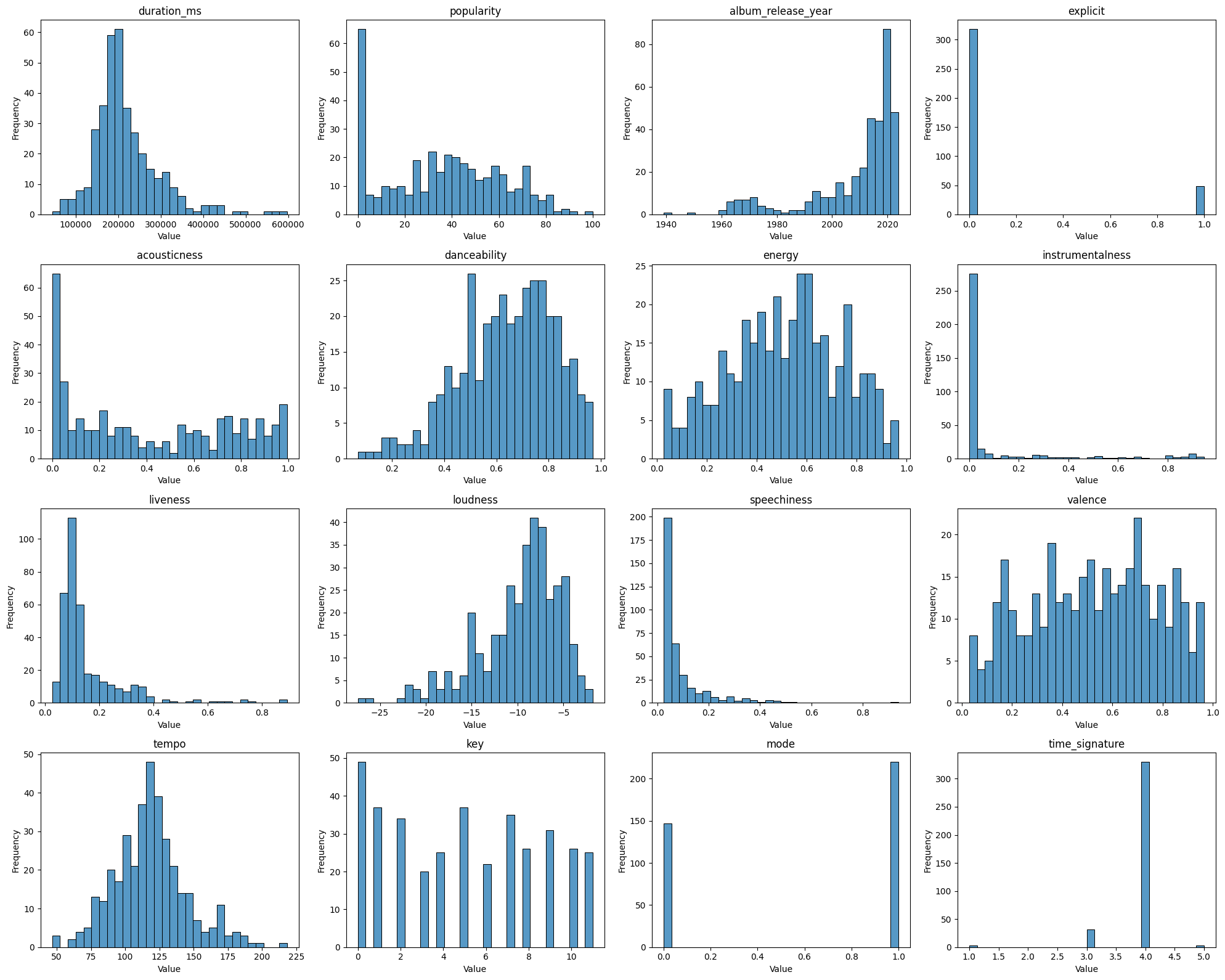
ta.plot_dataframe_distributions()
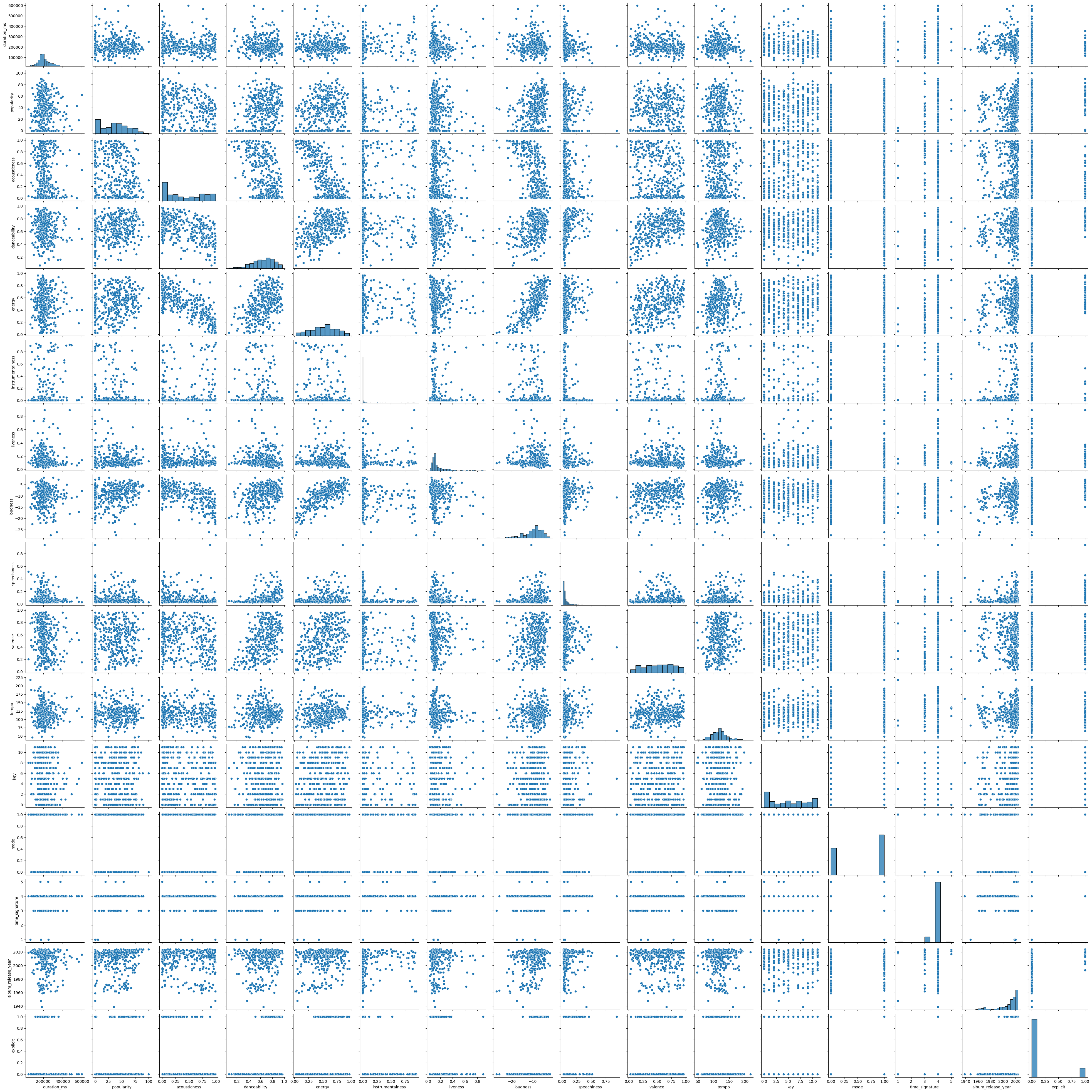
ta.plot_features_pairs()
This documentation as a single file: sung.md (Markdown, for agents).
built 2026-09-22 12:52 UTC from 7a64c55 (main) · sung 0.0.27 · about this build